Introduction
CAIMAN-ASR provides high-throughput and low-latency automatic speech recognition (ASR).
This document outlines the following:
Installation
The latest release is available for download from https://github.com/MyrtleSoftware/caiman-asr/releases.
This provides the following package:
- ML training repo
- Live demo client
The following packages can be obtained by contacting Myrtle.ai at caiman-asr@myrtle.ai:
- CAIMAN-ASR server:
caiman-asr-server-<version>.run - CAIMAN-ASR demo:
caiman-asr-demo-<version>.run - Performance testing client:
caiman-asr-client-<version>.run - Model weights
A .run file is a self-extractable archive; download and execute it to extract the contents to the current directory.
Key Features
CAIMAN-ASR enables at-scale automatic speech recognition (ASR), supporting up to 2000 real-time streams per accelerator card.
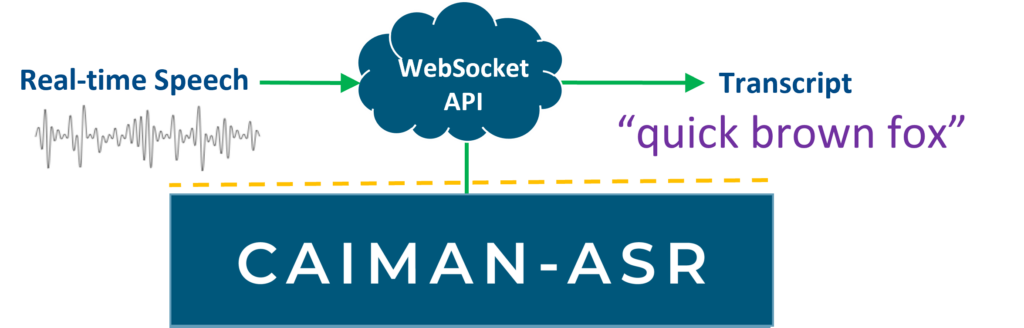
Lowest end-to-end latency
CAIMAN-ASR leverages the parallel processing advantages of Achronix’s Speedster7t® FPGA, the power behind the accelerator cards, to achieve extremely low latency inference. This enables NLP workloads to be performed in a human-like response time for end-to-end conversational AI.
Simple to integrate into existing systems
CAIMAN-ASR’s Websocket API can be easily connected to your service.
Scale up rapidly & easily
CAIMAN-ASR runs on industry-standard PCIe accelerator cards, enabling existing racks to be upgraded quickly for up to 20x greater call capacity. The VectorPath® S7t-VG6 accelerator card from BittWare is available off-the-shelf today.
Efficient inference, at scale
CAIMAN-ASR uses as much as 90% less energy to process the same number of real-time streams as an unaccelerated solution, significantly reducing energy costs and enhancing ESG (environmental, social, and governance) credentials.
Streaming transcription
CAIMAN-ASR is provided pre-trained for punctuated and cased English language transcription. For applications requiring specialist vocabularies or alternative languages, the neural model can easily be retrained with customers’ own bespoke datasets using the ML framework PyTorch.
Model Configurations
The solution supports three models: base, large and extra-large. These can be decoded with various configurations that trade off accuracy with latency and throughput, as the performance page describes.
The solution scales linearly up to 8 accelerators, and a single server has been measured to support 16000 real-time streams with the base model.
Product Overview
The CAIMAN-ASR solution is used via a websocket interface. Clients send audio data in chunks to the server, which returns transcriptions.
Components of the solution
-
CAIMAN-ASR bitstream: this is the bitstream that is flashed onto the FPGA. This bitstream supports all of the ML model architectures (for more details on the architectures, see the Models section). This only needs to be reprogrammed when a new update is released.
-
CAIMAN-ASR program: This contains the instructions for a particular model architecture (base, large or extra-large). The server has one built-in program per architecture and loads the right one at runtime. The model weights come from the
hardware-checkpointproduced during training, which the server loads directly. Pre-trained weights are provided for the base, large and extra-large architectures. -
CAIMAN-ASR server: This provides a websocket interface for using the solution. It handles loading the program and communicating to and from the card. One server controls one card; if you have multiple cards, you can run multiple servers and use load-balancing.
-
ML training repository: This allows the user to train their own models, validate on their own data, and export model weights for the server.
An example configuration of CAIMAN-ASR is as follows:

Performance
The solution has various configurations that trade off accuracy and performance. In this page:
- Realtime streams (RTS) is the number of concurrent streams that can be serviced by a single accelerator using default settings.
- Compute latency 99th-percentile (CL99) is the 99th-percentile compute latency, which measures how long it takes for a model to make a prediction for one audio frame. Note that CL99 increases with the number of concurrent streams.
- User-perceived latency (UPL) is the time difference between when the user finishes saying a word and when it is returned as a transcript by the system.
- WER is the Word Error Rate, a measure of the accuracy of the model. Lower is better.
- HF Leaderboard WER is the WER of the model on the Huggingface Open ASR Leaderboard. WER is averaged across 8 test datasets.
The WERs in the following section are for models trained on ~150k hours of mostly open-source data.
User-perceived latency explains what the latencies are made of.
Monolingual
The solution supports decoding with a beam search with an n-gram language model for improved accuracy. The solution supports greedy decoding for higher throughput.
| Model | Parameters | Decoding | RTS | CL99 at public RTS | p50 UPL | HF WER (<nopnc>/<pnc>) |
|---|---|---|---|---|---|---|
base | 85M | greedy | 2000/1600 | 28/45 ms | 203 ms | 9.91/9.94% |
base | 85M | beam | 1300/1200 | 80/50 ms | - | 9.13/9.17% |
large | 196M | greedy | 800/650 | 57/55 ms | - | 8.76/8.81% |
large | 196M | beam | 500/400 | 40/60 ms | 162 ms | 8.12/8.27% |
extra-large | 404M | greedy | 450/420 | 25/- ms | - | 8.11/8.07% |
extra-large | 404M | beam | 340/290 | 92/- ms | 127 ms | 7.55/7.64% |
Details:
- RTS and CL99 have two values, these are without/with state resetting (see below)
- p50 and CL99 are with the
<pnc>prefix - UPL numbers are measured by streaming LibriSpeech dev-clean to an on-site server with an FPGA backend, with about as many streams as the RTS column gives, without state resets.
State resets is a technique that improves the accuracy on long utterances (over 60s) by resetting the model’s hidden state after a fixed duration, at the cost of real-time streams. All the datasets in the HuggingFace benchmark are sufficiently short that state resets have only a minor (i.e. <.2%) effect on WER.
Monolingual models are fine-tuned variants of the multilingual models.
Multilingual
| Model | Parameters | Decoding | En | Fr | Es | De | It | Pt |
|---|---|---|---|---|---|---|---|---|
base | 85M | greedy | 12.73% | 16.25% | 12.06% | 15.87% | 16.24% | 20.95% |
base | 85M | beam, width=4 | 10.94% | 14.13% | 10.27% | 14.01% | 14.44% | 18.23% |
large | 196M | greedy | 11.06% | 13.46% | 9.48% | 12.81% | 13.93% | 16.66% |
large | 196M | beam, width=4 | 9.73% | 11.82% | 8.39% | 11.71% | 12.56% | 14.93% |
extra-large | 404M | greedy | 9.31% | 10.02% | 7.10% | 9.89% | 11.08% | 11.81% |
extra-large | 404M | beam, width=4 | 8.50% | 9.14% | 6.55% | 9.46% | 9.96% | 11.00% |
- The RTS/CL99 are the same as the above monolingual table but omitted for space.
- The WER’s are against the HF leader board datasets
ML training flow
Training a model takes these steps, each on its own page. Their examples train
the base model on LibriSpeech, which is quicker to train than large.
- Installation: clone the repository, install Docker and start the training container.
- Choose a model configuration.
- Data preparation: for LibriSpeech, one script downloads it and makes the tokenizer, the mel stats, the n-gram and the populated config (see Prepare LibriSpeech).
- Training.
- Validation, which reports the WER.
- Export an inference checkpoint for the server.
Installation
These steps run on Ubuntu 22.04 or newer, the releases Docker’s packages support.
Other Linux distributions may work, since most processing takes place in a Docker container,
but install_docker.sh is specific to Ubuntu.
Your machine does need NVIDIA GPU drivers installed.
Your machine does NOT need CUDA installed.
- Clone the repository
git clone https://github.com/MyrtleSoftware/caiman-asr-dev.git && cd caiman-asr-dev
- Install Docker, its buildx plugin and the NVIDIA Container Toolkit, which gives containers the GPUs
caiman_train/install_docker.sh
- Add your username to the docker group:
sudo usermod -a -G docker [user]
Run the following in the same terminal window, and you might not have to log out and in again:
newgrp docker
- Build the docker image
caiman_train/scripts/docker/build.sh
The launcher in step 5 also builds the image first, so this step only saves
waiting later. The first build is slow, most of it compiling
NVIDIA’s apex for every GPU architecture. Later builds are quick, unless the
dependencies changed. The image holds the Python environment from the
repository’s uv.lock, not the code: the launcher mounts your checkout into
the container, so editing the code needs no rebuild.
Each change to the dependencies leaves an old image and its build cache behind.
Run caiman_train/scripts/docker/gc.sh weekly, from cron for example, to remove
old training images and the build cache they leave behind. Docker
can also cap its build cache by itself: see
build garbage collection.
- Start an interactive session in the Docker container mounting the volumes, as described in the next section.
caiman_train/scripts/docker/launch.sh <DATASETS> <CHECKPOINTS> <RESULTS>
The container runs as your user, so the files it writes to the mounted directories are yours.
Requirements
The image’s CUDA version, its base image in caiman_train/Dockerfile, sets the
oldest NVIDIA driver it runs with: see NVIDIA’s
table of compatible drivers.
Information about volume mounts
Setting up the training environment requires mounting the three directories:
<DATASETS>, <CHECKPOINTS>, and <RESULTS> for the training data, model checkpoints, and results, respectively.
The following table shows the mappings between directories on a host machine and inside the container.
| Host machine | Inside container |
|---|---|
| the repository | /workspace |
<DATASETS> | /datasets |
<CHECKPOINTS> | /checkpoints |
<RESULTS> | /results |
If your <DATASETS> directory contains symlinks to other drives (i.e. if your data is too large to fit on a single drive),
they will not be accessible from within the running container. In this case, you can pass the absolute paths to your drives
as the 4th, 5th, 6th, … arguments to caiman_train/scripts/docker/launch.sh.
This will enable the container to follow symlinks to these drives.
During training, the model checkpoints are saved to the /results directory so it is sometimes convenient to
load them from /results rather than from /checkpoints.
Next Steps
Go to the Data preparation docs to see how to download and preprocess data in advance of training.
Model YAML configurations
Before training, you must select the model configuration you wish to train. Please refer to the key features for a description of the options available. Having selected a configuration it is necessary to note the config path and sentencepiece vocabulary size (“spm size”) of your chosen config from the following table as these will be needed in the subsequent data preparation steps:
| Name | Parameters | spm size | config | Acceleration supported? |
|---|---|---|---|---|
testing | 49M | 1023 | testing-1023sp.yaml | ❌ |
base | 85M | 8703 | base-8703sp.yaml | ✅ |
large | 196M | 17407 | large-17407sp.yaml | ✅ |
xlarge | ~404M | 17407 | xlarge-17407sp.yaml | ✅ |
It is recommended to train the base model on LibriSpeech as described here before training base, large or xlarge on your own data.
The base, large and xlarge architectures were optimized to provide a good tradeoff between WER and throughput on the accelerator.
Other architectures will not run on the accelerator.
train.sh will verify that you are training a model
that is supported by the accelerator.
If you want to skip this check so you can
train the testing model for more rapid iteration,
pass the flag --skip_state_dict_check to train.sh.
The xlarge architecture is the large one with 17 post-RNN encoder layers instead of 6.
It is called extra-large in the inference server and its release bundle.
Post-RNN residual schedule
Very deep encoders (e.g. the XL model, with 17 post-RNN layers) do not converge
as a plain stack of LSTMs. Passing --residual_schedule adds
an identity residual around every post-RNN layer after the first, which keeps
the deep stack trainable early on. The residual strength is then linearly
annealed from 1 to 0 between --residual_toggle_step and
--residual_toggle_step + --residual_ramp_steps, after which the model is a plain
stack again.
The residual adds no parameters and is a training-only device: it is not part of the model config and is not included in the hardware checkpoint. Hardware checkpoints are therefore only written once the residual has been fully annealed away.
Missing YAML fields
The configs referenced above are not intended to be edited directly. Instead, they are used as templates to create <config-name>_run.yaml files. The templates hold placeholders in capitals, such as SENTENCEPIECE, STATS_SUBDIR and MAX_DURATION, which caiman_train/scripts/create_config_set_env.sh fills in to write the _run.yaml file.
For example usage, see the following documentation: Prepare LibriSpeech in the JSONL format.
Data preparation
Having chosen which model configuration to train, you will need to complete the following preprocessing steps:
- Prepare your data in one of the supported training formats:
JSONLorSHAR. - Create a sentencepiece model from your training data.
- Record your training data log-mel stats for input feature normalization.
- Populate a YAML configuration file with the missing fields.
- Generate an n-gram language model from your training data.
- Optionally standardize transcripts
Text normalization
The examples train an English model (langs: [en]), whose character set Changing the character set describes.
Transcripts will be normalized on the fly during training, as configured by
the standardize_text, preserve_case, and preserve_punctuation fields
in the YAML config templates.
That page also covers configuring the character set and normalization,
including for models trained on multiple languages.
During validation, the predictions and reference transcripts will be standardized.
See also
- Prepare LibriSpeech in
JSONLformat - Supported dataset formats
- Input activation normalization
- Controlling the proportion of data from each manifest for multilingual/multi-manifest training
Supported Dataset Formats
CAIMAN-ASR supports reading data from the following formats:
| Format | Modes | Description | Docs |
|---|---|---|---|
JSONL | training + validation | All audio files in a single directory hierarchy with transcripts in JSONL file(s) referencing these audio files. | [link] |
SHAR | training | Sharded tarred audio with per-shard JSONL metadata | [link] |
To train on your own proprietary dataset you will need to arrange for it to be in the JSONL or SHAR format.
A worked example of how to do this for the JSONL format is provided in jsonl_format.md.
For more details on the SHAR format please see shar_format.md.
If you have a feature request to support training/validation on a different format, please open a GitHub issue.
JSONL format
The JSONL format is the default in this repository and if you are training on your own data it is recommended to manipulate it into this format. Note that the data preparation steps are slightly different given the model you have decided to train so please refer to the model configuration page first.
The JSONL format stores a Lhotse
CutSet, each cut
must have a recording and a single supervision.
Prepare LibriSpeech in JSONL format
This page takes LibriSpeech as it is distributed from the https://www.openslr.org website and prepares it into a JSONL manifest format.
Quick Start
To run the data preparation steps for LibriSpeech and the base model run the following in the container, from caiman_train/, where it starts:
# Download data to /datasets/LibriSpeech: requires 120GB of disk
./scripts/prepare_librispeech.sh
For another configuration, pass its spm size and config name from the
model configurations table, for example for large:
SPM_SIZE=17407 CONFIG_NAME=large-17407sp ./scripts/prepare_librispeech.sh
If ~/datasets on the host is mounted to /datasets, the downloaded data will be accessible outside the container at ~/datasets/LibriSpeech.
Further detail: prepare_librispeech.sh
The script downloads LibriSpeech to /datasets/LibriSpeech, writes a
librispeech-<subset>-flac.cuts.jsonl.gz manifest beside each subset and adds
<EOS> tokens to their transcripts. From the train-960h
subsets it then makes the
missing fields of the
config: the sentencepiece tokenizer in /datasets/sentencepieces/, the
log-mel stats in /datasets/stats/, the
n-gram language model in /datasets/ngrams/, and the populated
configs/<config-name>_run.yaml. _run indicates that this is a complete
config, not just a template.
Selecting transcripts
Each supervision must include a “text” field, which contains the transcript of the corresponding audio file.
If multiple transcripts exist for the same audio file, the model can be trained using a specific transcript by specifying it in the use_transcripts field of the YAML configuration:
use_transcripts:
  to_use: ["<transcript_key_1>", "<transcript_key_2>", ...]
  on_missing: "raise_error" # or "use_default"
These extra transcripts are stored as custom data inside each supervision.
The first transcript key that is found in the JSONL manifest will be used.
If no key is found in the JSONL manifest, the behaviour will depend on the value of the on_missing field:
- “raise_error”: an error will be raised.
- “use_default”: the default transcript will be used.
Standardizing transcripts
Training on multiple datasets can negatively impact performance, as identical words may be transcribed differently across datasets - for example, “colour” (British English) vs “color” (American English). This inconsistency splits the model’s probability distribution across multiple spellings, reducing prediction confidence.
To address this, we standardize the training transcripts using Whisper EnglishTextNormalizer. This process follows the same approach as WER standardization (see WER calculation docs for more details).
On-the-fly standardization
standardize_text: true in the YAML config, the templates’ default,
standardizes the training transcripts on the fly during training. With the
SHAR data format this is overlapped with GPU compute, so it costs little
training speed.
On-the-fly standardization expands all contractions (e.g “don’t” -> “do not”). As a result, a model trained on standardized transcripts will always predict the expanded form e.g. it will output “do not” whether the speaker says “don’t” or “do not”.
Alternative: pre-standardizing manifests
Alternatively, standardize your manifests once, before training:
python -m caiman_train.data.text.standardize_manifest \
  --manifests /path/to/shar/manifest1 /path/to/shar/manifest2 \
  --output-dirs /path/to/output/for/manifest1 /path/to/output/for/manifest2 \
  --model-config /path/to/model_config.yaml \
  --lang_code en \
  --preserve-case \
  --preserve-punctuation
This stores the standardized text of each supervision in a
transcript-standardized custom field, or, with --transcript-fields, each
named field <field> in <field>-standardized. --help lists the other
options. Unlike on-the-fly standardization, the script expands contractions
only with --expand-contractions; not expanding them worsens WERs by ~1-2%
relative.
Train on the standardized field by selecting it in your model’s YAML, and
turn off on-the-fly standardization with standardize_text: false:
use_transcripts:
  to_use: ["transcript-standardized"]
  on_missing: "raise_error" # or "use_default"
Preserving casing and punctuation
The preserve_case and preserve_punctuation fields of the YAML config
decide whether training standardization keeps the transcripts’ casing and
punctuation. This is irrelevant to the WER calculation, which always lowercases
and standardizes the transcripts before calculating WER.
Next steps
Having run the data preparation steps, go to the training docs to start training.
See also
SHAR format
The SHAR format is a sharded tarred archive format developed as part of Lhotse. CAIMAN-ASR’s training is optimized to work with SHAR archives, which provide efficient storage and retrieval of large datasets. SHAR allows efficient randomization of data order as well as de-duplication across data workers. To convert your data into the SHAR format use:
python -m caiman_train.lhotse.scripts.convert cuts2shar \
  /path/to/data.cuts.jsonl.gz \
  /path/to/out/dir/ \
  --compression flac \
  --sample-rate 16000
These SHAR datasets can then be used in your train_dataset.yaml as follows:
format: multilingual-shar
languages:
  lang_code:
    canary:
      alpha: 0.5
    datasets:
      - /path/to/out/dir/:
      - /some/other/shar/dir/:
See the convert script’s --help for further options.
Log-mel feature normalization
We normalize the acoustic log mel features based on the global mean and variance recorded over the training dataset.
Record dataset stats
python -m caiman_train.data.generate_mel_stats computes these statistics
and stores them as PyTorch tensors. caiman_train/scripts/make_json_artifacts.sh shows how to run it.
Training stability
Empirically, it was found that normalizing the input activations with dataset global mean and variance makes the early stage of training unstable.
So when both --norm_ramp_start and --norm_ramp_end are set, training moves between two modes of normalization on a schedule.
This is controlled by the arguments in caiman_train/src/caiman_train/args/mel_feat_norm.py.
Validation
When running validation, the dataset global mean and variance are always used for normalization regardless of how far through the schedule the model is.
Backwards compatibility
Prior to v1.9.0, the per-utterance stats were used for normalization during training (and then streaming normalization was used during inference).
To evaluate a model trained on <=v1.8.0, use the --norm_over_utterance flag to the val.sh script.
Training
Training Command
Quick Start
This example demonstrates how to train a model on the LibriSpeech dataset using the base model configuration.
This guide assumes that the user has followed the installation guide
and has prepared LibriSpeech according to the data preparation guide.
Selecting the batch size arguments is based on the machine specifications. More information on choosing them can be found here.
Recommendations for LibriSpeech training are:
- a global batch duration of ~20k seconds for a 24GB GPU
- use all
train-*subsets and validate ondev-clean - 42000 steps is sufficient for 960hrs of train data
- adjust number of GPUs using the
--num_gpus=<NUM_GPU>argument
To launch training inside the container, using a single GPU, run the following command:
./scripts/train.sh \
  --train_dataset_yaml ./configs/librispeech.yaml \
  --val_manifests librispeech-dev-clean-flac.cuts.jsonl.gz \
  --val_data_dir /datasets/LibriSpeech \
  --val_standardizer_lang en \
  --model_config ./configs/base-8703sp_run.yaml \
  --num_gpus 1 \
  --batch_duration 1800 \
  --grad_accumulation_batches 10 \
  --val_batch_size 1 \
  --training_steps 42000
The output of the training command is logged to /results/training_log_[timestamp].txt.
The arguments are logged to /results/training_args_[timestamp].json,
and the config file is saved to /results/[config file name]_[timestamp].yaml.
Defaults to update for your own data
When training on your own data you will need to change the following args from their defaults to reflect your setup:
--train_dataset_yaml--val_data_dir--val_manifests--val_standardizer_lang
The audio paths stored in manifests are relative to their data_dir: the one beside
each manifest in the dataset yaml, or --val_data_dir for validation. For example,
if your audio file path is train/1.flac and the data_dir is /datasets/LibriSpeech, then the dataloader
will try to load audio from /datasets/LibriSpeech/train/1.flac.
The learning-rate scheduler argument defaults are tested on 1k-50k hrs of data but when training on larger datasets than this you may need to tune the values. These arguments are:
--warmup_steps: number of steps over which learning rate is linearly increased from--min_learning_rate--hold_steps: number of steps over which the learning rate is kept constant after warmup--half_life_steps: the half life (in steps) for exponential learning rate decay
If you are using more than 50k hrs, it is recommended to increase --half_life_steps. Note that increasing
it increases the probability of diverging later in training.
Arguments
To resume training or fine tune a checkpoint see the documentation here.
The default setup saves an overwriting checkpoint every time the Word Error Rate (WER) improves on the dev set.
Also, a non-overwriting checkpoint is saved at the end of training,
and others every --save_frequency steps.
For a complete set of arguments and their respective docstrings see
args/train.py
and
args/shared.py.
Controlling the proportion of data from each manifest
If you would like to adapt the proportion of data that the model sees from each manifest per batch you can adjust the weights in the train dataset yaml, for example:
format: multilingual-jsonl
languages:
  lang_code:
    datasets:
      - /datasets/demo/hi_quality.cuts.jsonl.gz:
          weight: 1.0
      - /datasets/demo/lo_quality.cuts.jsonl.gz:
          weight: 1.0
This would have 50% of utterances from hi_quality and 50% from lo_quality in
each batch. This is useful if, for example, lo_quality is much larger than
hi_quality and more efficient than truncating lo_quality as the model would
then not see all the data.
When manifest balancing is on we use the word epoch to mean: the minimum time until any sample is seen again. This parallels the definition used when manifest balancing is off but relaxes the condition that all the data must be seen.
Canary-manifest balancing
Setting the train manifest ratios can be a laborious task that requires much experimentation, a sensible default can be obtained from the canary paper:
$$ p_s \sim \left( \frac{n_s}{N} \right)^\alpha $$
With \(p_s\) the prob of sampling from the \(s\)-th manifest, \(n_s\) the
number of hours in the corresponding manifest, \(N\) the total number of
hours and \(\alpha\) the alpha set in the dataset yaml below:
$$ N = \sum_s n_s $$
We do manifest balancing in utterance space instead of time space, these are related by a manifest dependent constant:
$$ n_s \approx k_s u_s $$
With \(u_s\) the number of utterances in the \(s\)-th manifest. Hence if we want the number of hours of each epoch to match the canary proportions we need:
$$ \begin{align} r_s = \frac{p_s}{k_s} = \frac{u_s}{n_s} \left( \frac{n_s}{\sum_i n_i} \right)^\alpha \end{align} $$
Where \(r_s\) is the manifest ratio needed in the weight field of the
dataset yaml. This is all computed automatically when the following is added to
the yaml file for datasets of a language:
format: multilingual-shar
languages:
  lang_code:
    canary:
      alpha: 0.5
Multilingual manifest balancing
When training multilingual models it is often desirable to balance both within and across languages. This can be achieved through hierarchical manifest balancing. For example, consider the following dataset yaml:
format: multilingual-shar
canary:
  alpha: 0.5
languages:
  bg:
    canary:
      alpha: 0.75
    datasets:
      - /shar/dataset/a:
      - /shar/dataset/b:
  da:
    canary:
      alpha: 0.5
    datasets:
      - /shar/dataset/c:
      - /shar/dataset/d:
This would balance within each language bg with alpha=0.75 and da with
alpha=0.5 to produce two sets of two weights. Then it would manifest balance
across the two languages bg and da (treating each as a single dataset) with
alpha=0.5 to produce another set of two weights. The final weight for each
dataset is the product of the two weights.
Data Augmentation for Difficult Target Data
If you are targeting a production setting where background noise is common or audio arrives at 8kHZ, see here for guidelines.
Monitor training
To view the progress of your training you can use TensorBoard. See the TensorBoard documentation for more information of how to set up and use TensorBoard.
Profiling
To profile training, see these instructions.
Controlling emission latency
See these instructions on how to control emission latency of a model.
Next Steps
Having trained a model:
- If you’d like to evaluate it on more test/validation data go to the validation docs.
- If you’d like to export a model checkpoint for inference go to the hardware export docs.
See also
Batch size hyperparameters
This page gives guidance on how to select the batch size hyper-parameters for your machine.
Batch size in CAIMAN-ASR can be fixed or dynamic, depending on the
--sampling_mode: build_from_legacy_sources in
caiman_train/src/caiman_train/lhotse/config_build.py maps each mode to its
sampler and the flags it needs.
grad_accumulation_batches (GAB)
One optimizer step is taken every --grad_accumulation_batches batches. Each
GPU runs the same number of batches (the elements per batch may differ between
ranks) and the gradients are reduced across GPUs before the step, so the batch
the model sees per step is:
global_batch_size = avg_per_gpu_batch_size * num_gpus * grad_accumulation_batches
RNN-T models need a large global_batch_size to reach good WERs — aim for
>1024 utterances or >5 hours — but the larger it is, the longer training
takes.
GAB does not change the VRAM usage; the per-GPU batch does. Take the largest per-GPU batch that does not OOM, then set GAB to reach the global batch size you want.
joint_lattice_cap (JLC)
The joint network’s output needs far more VRAM than the encoder and prediction
networks do for the same batch, so each batch is split again before the joint
and loss. The encoder and prediction still run at the full per-GPU batch (--batch_size or its
dynamic counterparts)
— they are most of the compute, so under-filling them would cost throughput.
Each split holds at most --joint_lattice_cap lattice cells, where an utterance
contributes enc_len * (token_len + 1) cells. This budgets the joint and loss
independently of the batch size and the utterance lengths, and does not affect
WER.
Set it before the batch, since it decides how much VRAM the batch gets. Too
small and the split count grows until per-split overhead dominates; past the
knee, each doubling costs twice the VRAM for under 1% more joint+loss
throughput. Typical values are 2^20-2^21 at V=1024, 2^18-2^19 at V=8704 and
2^17-2^18 at V=17408.
Summary
- Set
--joint_lattice_capfirst. Measure it for your GPU withpython -m caiman_train.train_utils.jlc_bench --model <model>(see--help). - Tune the sampler arguments (duration, bucketing, fixed batch size) for the largest per-GPU batch that fits.
- Set
--grad_accumulation_batchesso the global batch reaches your target duration.
Test with your full training dataset: the utterance length distribution drives peak VRAM.
Training on heterogeneous CPUs
Modern desktop computers may have heterogeneous CPUs i.e. performance and
efficiency cores. If you launch the data-loader with the default number of
cores this can slow down your train as the pipeline will be bottle-necked by
the much slower efficiency cores. This effect can be quite pronounced. For
example, on an 13th Gen Intel(R) Core(TM) i7-13700K training with 24 loader
worker threads trains at 350 UTT/s but training on 8 cores runs close to 500
UTT/s! To determine the correct number of cores run lstopo --of console. Then
set --loader_workers_per_gpu= as appropriate (you may need to apt install
hwloc).
TensorBoard
The training scripts write TensorBoard logs to /results during training.
TensorBoard runs on the host, from the repository’s uv environment, with no container or GPU. Install uv, then, from the repository’s root, in another terminal:
caiman_train/scripts/docker/launch_tb.sh <results_dir> ...
Run it with no arguments for its options.
It prints the port it serves on. Then navigate to http://<training hostname>:<port> in a web browser.
Stop TensorBoard with Ctrl-C.
Challenging target data
This page describes data augmentations that may help with these problems:
- Problem: Your target audio has non-speech background noise
- Solution: Train with background noise
- Problem: Speakers in your target audio talk over each other
- Solution: Train with babble noise
- Problem: Your target audio is recorded on a poor-quality microphone
- Solution: Train with microphone augmentations
- Problem: Your target audio is in a different room environment to your training data
- Solution: Train with room augmentations
Page contents
- Background Noise for training with background noise
- Babble Noise for training with babble noise
- Microphone and Room Augmentations
- Inspecting Augmentations to listen to the effects of augmentations
- Random State Passing for training on long sequences
- Cut Concatenation for training on long-form examples
- Tokens Sampling for training with random tokens sampling
- Label Smoothing for training with label smoothing
- Gradient Noise for training with gradient noise
Background noise training
Background noise is set via the --prob_background_noise argument.
Background noise takes a noise file and mixes it with the speech.
Implementation
The noise data is combined with speech data on-the-fly during training, using a
signal to noise ratio (SNR) randomly chosen between internal variables low
and high. The values for low and high can be specified (in dB) using the
--noise_snr_low and --noise_snr_high arguments when calling train.sh.
Before combination, the noise audio will be duplicated to become at least as long as the speech utterance.
Background noise dataset
By default, background noise will use Myrtle/CAIMAN-ASR-BackgroundNoise from the Hugging Face Hub.
Note that this dataset will be cached in ~/.cache/huggingface/ in order to persist between containers.
You can change this location like so: HF_CACHE=[path] caiman_train/scripts/docker/launch.sh ....
To change the default noise dataset, set --noise_dataset to an audio dataset on the Hugging Face Hub.
The training script will use all the audios in the noise dataset’s train split.
Babble noise training
Babble noise can be emulated using the background noise mechanism whilst supplying noise data that includes human speech.
Microphone and room augmentations
These are both created by convolving impulse response functions with the audio
signal. Set --prob_room_aug to a non zero value to enable convolution with
simulated room impulse responses. Alternatively, set --room_dataset to a path
to a lhotse recording-set to use your own room impulse responses.
We recommend the room impulse responses of “A Study on Data Augmentation of Reverberant Speech for Robust Speech Recognition”, OpenSLR 28.
For microphone augmentations, we recommend using the impulse responses from the “Microphone impulse response project”
Inspecting augmentations
To listen to the effects of augmentations, pass --inspect_audio. All audios will then be saved to /results/augmented_audios after augmentations have been applied. This is intended for debugging only—the data pipeline is slower with this option, and a full epoch of saved audios will use as much disk space as the training dataset.
Random State Passing
RNN-Ts can find it difficult to generalise to sequences longer than those seen during training, as described in Chiu et al, 2020.
Random State Passing (RSP) (Narayanan et al., 2019) reduces this issue by simulating longer sequences during training. It does this by initialising the model with states from the previous batch with some probability. On in-house validation data, this reduces WERs on long (~1 hour) utterances by roughly 40% relative.
Further details
Experiments indicated:
- It was better to apply RSP 1% of the time, instead of 50% as in the paper.
- Applying RSP from the beginning of training raised WERs, so RSP is only applied after
--rsp_delaysteps--rsp_delaycan be set on the command line; the docstring ofset_rsp_delay_defaultfunction gives its default. To see the benefits from RSP, it is recommended that >=5k updates are done after the RSP is switched on, so the default will not be appropriate if you intend to cancel training much sooner than this.
RSP is on by default, and can be modified via the --rsp_seq_len_freq argument, e.g. --rsp_seq_len_freq 99 0 1.
This parameter controls RSP’s frequency and amount; see the --rsp_seq_len_freq docstring in args/train.py.
RSP requires Myrtle.ai’s custom LSTM (custom_lstm: true in the model config).
See also
RSP is applied at training-time. An inference-time feature, state resets can be used in conjunction with RSP to further reduce WERs on long utterances.
Implementation notes
Unintuitively, random state passing requires the penultimate hidden state and
the last embedding token of the previous batch. Consider two utterances, with
token sequences [I, like, cats] and [You, love, dogs]
By training on the concatenation of these two utterances, the prediction net calculation looks like:
(A)
SOS I like cats You love dogs
  ↘  ↘    ↘   ↘   ↘   ↘   ↘
0 ➡h1➡h2 ➡h3 ➡h4 ➡h5 ➡h6 ➡h7
Here 0 is the zero embedding vector which LSTMs use as the initial hidden state for SOS.
By training on these utterances individually, the pred net calculations are:
(B)
SOS I like cats
  ↘  ↘   ↘    ↘
0 ➡h1➡h2 ➡h3 ➡h4
And:
(C)
SOS You love dogs
  ↘    ↘   ↘   ↘
0 ➡h1 ➡H2 ➡H3 ➡H4
Where H_i is a different state from h_i. Note that for the second utterance (C) the hidden states are different than in A, because the context of the first utterance is lost. This can be fixed by replacing (SOS, 0) in C with (cats, h3) from (B):
(D)
cats You love dogs
   ↘    ↘   ↘   ↘
h3 ➡h4 ➡h5 ➡h6 ➡h7
Hence, (D) has the same hidden states as A since combining the tokens and states is done the same way as in (A).
Thus, it’s required to save the embedding of last token (e.g. cats) and the next-to-last state (e.g. h3) to make this work.
For full details see the implementation in caiman_model/src/caiman_model/model.py
Cut Concatenation
Cut concatenation builds long-form training examples by joining utterances
together. It is off by default and is enabled with --concat_max_duration.
Utterances are shuffled and then appended one after another, with a gap of
silence between them, until the next one would take the example past
--concat_max_duration seconds. Only
utterances with the same prefix and language are joined, and their transcripts
are joined in the same order. An utterance longer than --concat_max_duration
is used on its own. Each example draws its gap from Uniform(LOW, HIGH), set by
--concat_gap LOW HIGH, so the model cannot learn
a fixed gap length.
This happens before batching, so it works with any sampling mode.
Validation can be concatenated in the same way with --val_concat_max_duration
and --val_concat_gap. This measures long-form WER on short-utterance
validation sets, and gives the same examples on every validation pass.
State resets are on by default during validation, and they
split the audio into --sr_segment-second chunks. To actually evaluate the model
on long-form audio, turn them off with --sr_segment=0.
Concatenation can also join utterances of different languages, to train on examples that switch language: see Code switching.
Tokens Sampling
Text needs to be in the form of tokens before it is processed by the RNNT. These tokens can represent words, characters, or subwords. CAIMAN-ASR uses subwords, formed out of the character set configured for the model (see Changing the character set). The tokens are derived from the tokenizer model SentencePiece. A SentencePiece tokenizer model can be trained on raw text, and produces a vocabulary with the most probable subwords that emerge in the text. These derived vocabulary entries (i.e. the tokens) are scored according to the (negative log) probability of occurring in the text that the tokenizer was trained on. The tokenizer entries include all the individual characters of the text, in order to avoid out-of-vocabulary error when tokenizing any text. When using the tokenizer model to convert text into tokens the user has the option of tokenizing not with the most probable tokens (subwords), but with a combination of tokens that have lower score.
Utilising the random tokens sampling is a form of data augmentation and it is applied on a percentage of the training data, and not on the validation data. This can be done with setting the sampling parameter into a real value in the range [0.0, 1.0] in the configuration file, e.g.:
sampling: 0.05
A value of 0.05 means that 5% of the training data will be tokenized with random tokens sampling. A value of 0.0 means no use of tokens sampling, whereas a value of 1.0 applies random tokens sampling in the whole text.
Label smoothing
Label smoothing is the process of softening target labels in a classification problem. Normally this is achieved by transforming a delta-function target to a delta-function plus uniform distribution. However, the extension of this to RNNT is not straightforward if non-local smoothing is desired. Myrtle uses a doubly-stochastic approach: alternative labels are synthesized on the fly and used a small percentage of the time. This smooths the averaged target over multiple optimizer steps. The labels are generated by replacing words in the ground-truth label with “close” words (as determined by the Levenshtein distance).
Label smoothing is on by default, it is controlled by the label_smoothing_kwargs
sub-key of the tokenizer configuration in the config file:
label_smoothing_kwargs:
  dict_path: "<path/to/words.txt>"
  levenshtein_threshold: <float>
  prob_smooth_word: <float>
Where dict_path is the path to the dictionary file, this should be formatted
the same as a standard unix dictionary file (see /usr/share/dict/words or
/usr/dict/words). levenshtein_threshold * len(word) is the maximum Levenshtein distance
for words to be considered “close”. prob_smooth_word is the probability of a word
being replaced by a “close” word (the “close” words are sampled uniformly).
The configs in caiman_train/configs hold recommended values.
Gradient Noise
Adding Gaussian noise to the network gradients improves generalization to out-of-domain datasets by not over-fitting on the datasets it is trained on. Inspired by the research paper by Neelakantan et. al., the noise level is sampled from a Gaussian distribution with \(mean=0.0\) and standard deviation that decays according to the following formula:
$$ \sigma(t)=\frac{noise}{{(1 + t - t_{start})}^{decay}}, $$
\(noise\) is the initial noise level, \(decay\) is the decay constant (decay_const), \(t\) is the step,
and \(t_{start}\) is the step when the gradient noise is switched on.
Training with gradient noise is switched off by default. It can be switched on by setting the noise level to be a positive value in the config file.
Experiments indicate that the best time to switch on the gradient noise is after the warm-up period
(i.e. after warmup_steps). Moreover, the noise is only added in the gradients of the encoder components,
hence if during training the user chooses to freeze the encoder, adding gradient noise will be off by default.
Resuming and Fine-tuning
The --resume option to the train.sh script continues training, with the optimizer state, from --checkpoint if
given, otherwise from the last checkpoint in the output directory. Training continues from the checkpoint’s step, but
the data order differs from an uninterrupted run.
The --fine_tune option ensures that training starts anew, with a new learning rate schedule and optimizer state, from
the --checkpoint.
Resuming also restores the state of the training schedules (delay penalty, STAR
and WST), so for example a penalty that has already ramped up stays ramped up
rather than restarting from its initial value. --fine_tune restarts these
schedules.
To freeze the encoder weights during training change the enc_freeze option in the config file to:
rnnt:
  enc_freeze: true
Fine-tuning a multilingual model on a subset of languages
If you trained a multilingual model with, say, langs: [en, fr, de] (see
Training on multiple languages),
you can resume its training on only some of those languages, for example
just French, by adding ft_langs to the model config:
langs: [en, fr, de]
ft_langs: [fr]
ft_langs is optional and, when present, selects which of the manifest’s
languages are loaded as training data, in place of langs. Crucially,
langs itself is left untouched, so the sentencepiece tokenizer, ngram
model, and mel stats are unaffected and stay identical to the original
model - only the training data changes.
Then train from the multilingual checkpoint with --checkpoint <path> and
--resume or --fine_tune, as above, and set --training_steps: it is the
step to stop at. --resume carries on from the checkpoint’s step, so set it
beyond that (training won’t start otherwise), while --fine_tune starts again
from step 1, so it is the length of the fine-tune.
Keep the rest of the model config as it was for the multilingual model, in
particular langs, the tokenizer, the mel stats and the n-gram: the checkpoint
was trained with them.
ft_langs has no effect on validation, which continues to use whatever
--val_manifests/--val_standardizer_lang are passed on the command line.
Profiling
You can turn on profiling by passing --profiler in your training or validation command. Note that profiling will likely slow down the script and is intended as a debugging feature.
Some of the profiling results are only saved after the script completes so it is necessary to avoid killing with Ctrl + C if you want to record the full profiling results.
As such, when profiling training it is recommended to:
- profile a small number of
--training_steps
Similarly, when profiling validation it is recommended to use --nth_batch_only=<batch idx>
Profiling results will be saved in [output_dir]/benchmark/. This consists of:
-
yappi logs named
program[rank]_[timestamp].prof. These can be viewed via SnakeViz:Launch a container with the command
SNAKEVIZ_PORT=[an unused port] caiman_train/scripts/docker/launch.sh .... Inside the container, run./scripts/profile/launch_snakeviz.bash /results/benchmark/program[rank]_[timestamp].profThis will print an interactive URL that you can view in a web browser.
-
top logs named
top_log_[timestamp].html. These can be viewed outside the container using a web browser. -
nvidia-smi text logs named
nvidia_smi_log_[timestamp].txt. -
Manual timings of parts of the training loop, totalled over the run, one text file per rank named
timings_stepN_rankM_[timestamp].txt, whereNis the final step. -
system information in
system_info_[timestamp].txt.
Sending results
In order to share debug information with Myrtle.ai please run the following script:
OUTPUT_DIR=/<results dir to share> TAR_FILE=logs_to_share.tar.gz ./scripts/tar_logs_exclude_ckpts.bash
This will compress the logs excluding any checkpoints present in OUTPUT_DIR. The resulting logs_to_share.tar.gz file can be shared with Myrtle.ai or another third-party.
Changing the character set
With default training settings, the CAIMAN-ASR model will output punctuated and cased text in the characters of the languages that training is performed on.
This page describes how to change the settings to support additional characters, different languages, or multiple languages at once.
The code has been tested with English and other european language training. If you would like additional support for a specific language, please contact caiman-asr@myrtle.ai
Guidelines
Step 1: Choose a character set
The character set is not written out by hand. Instead, it is derived
automatically from the langs field of the model config, which lists the
ISO language codes you want the model to support, for example:
langs: [en]
For each language code, ICU supplies the set of
characters typically used to write that language (both lower and upper case).
These per-language characters are combined with a fixed set of shared
punctuation, digits and currency symbols, and space, to make the final character
set: see
caiman_eval/text/allowed_charset.py.
If you list more than one language in langs, the character sets for all of
the languages are unioned together, for example langs: [en, fr] produces a
character set containing both the English and French alphabets. See
Training on multiple languages below for
how such a model is trained and used.
langs and tokenizer.labels are mutually exclusive. If ICU’s exemplar set
for a language doesn’t give you the character set you want, you can instead
write the character set out by hand as tokenizer.labels in the model config,
skipping langs entirely. The rest of this page still applies — the
per-utterance lang_code used for on-the-fly normalization in Step 2 still
comes from the language codes in your dataset yaml either way.
The maximum size of your character set is the sentencepiece vocabulary size, as each character in the character set receives a unique token in the sentencepiece vocabulary. See here for the vocabulary size for each model configuration.
We recommend keeping the character set at least an order of magnitude smaller than the sentencepiece vocabulary size. Otherwise there may be too few multi-character subwords in the vocabulary, which might make the model less effective.
Step 2: Configure normalization
It’s possible for the raw training data to contain characters other than those in the character set. For instance, an English dataset might contain “café”, even if the character set is only ASCII.
Every transcript is passed through a fixed pipeline of steps, some of which are optional and configurable:
- Transliteration (always on): characters not in the character set are transliterated to their closest ASCII equivalent, for example “café” becomes “cafe” and “straße” becomes “strasse”. Case is ignored when deciding which characters are in the set.
- Standardization (optional): applies
Whisper-style normalization to English transcripts: stripping filler words
(e.g. “um”, “uh”), expanding contractions, and standardizing British/American English
spelling. This step is controlled by
standardize_textin the yaml config, and is disabled for validation. - Replacements (optional, see Step 3 below): your own custom string substitutions.
- Tag removal (always on): tags such as
<silence>or<foreign_word>are stripped out. - Scrubbing (always on): any character still not in the character set is replaced with a space.
Note that digit-to-word conversion (e.g. “123rd” becoming
“one hundred and twenty-third”) is not part of the pipeline,
so a <pnc> transcript (or a non-conditionally-trained model) keeps
digits as digits. It still happens on a separate lowercase-normalization path
used for the <nopnc> variant of a transcript under conditional
training, and for WER
computation during validation (see WER
standardization). If you want digits
spelled out for <pnc> or non-conditional output too, include the conversion
in your own custom replacements (Step 3) or pre-process your transcripts
before training.
Step 3: Custom replacements
You may want to tweak how text is normalized, beyond what the pipeline above does automatically. For example, you might want to make the following changes to your training transcripts:
- Replace “;” with “,”
- Replace “-” with “ “ if “-” isn’t in your character set, so that “twenty-one” becomes “twenty one” instead of “twentyone”
You can make these changes by adding custom replacement instructions to the yaml file. Example:
replacements:
  - old: ";"
    new: ","
  - old: "-"
    new: " "
In the normalization pipeline, these replacements are applied
after standardization and before the transcripts are scrubbed
of characters not in the character set.
The replacements are applied even if standardize_text is disabled,
although by default there are no replacements.
Step 4: Tag removal
Some datasets contain tags, such as <silence> or <affirmative>.
These tags are always removed from the training transcripts
during on-the-fly text normalization, before the text is tokenized.
Hence the model will not predict these tags during inference.
If you want the model to be trained with tags and possibly predict tags
during inference, you’ll need to add them as user symbols in the model config,
(wrapped in angle brackets, e.g. <silence>),
and train your tokenizer on a dataset containing them.
Step 5: Update fields in the model configuration
You’ll want to update:
- the character set by
- updating the languages under
langsto the languages included in your model - or, for a fully custom character set, updating
tokenizer.labels
- updating the languages under
- whether to standardize transcripts on the fly, under
standardize_text - whether standardization preserves casing and punctuation, under
preserve_caseandpreserve_punctuation - the replacements under
replacements
Note that only one of labels or langs should be present in the model config.
The languages provided in the langs should be ISO language codes, for example:
en for English, es for Spanish. If using country codes, please use an underscore
instead of a hyphen as normally used in ISO standards. For example, for US English, use
en_US
Step 6: Train a sentencepiece model
The following command is used to train the Librispeech sentencepiece model using the default character set, as happens here:
python -X utf8 -m caiman_train.data.spm.spm_from_json \
	--spm_size "$SPM_SIZE" \
	--spm_name "$SPM_NAME" \
	--train_dataset_yaml $TRAIN_MANIFEST_YAML \
	--output_dir /datasets/sentencepieces \
	--model_config "$RUN_CONFIG" \
	--input_sentence_size 5000000 \
	--num_gpus "$NUM_GPUS"
This script reads the config file, so it will train the correct sentencepiece model for your character set and replacements.
You may also wish to run some other scripts in
scripts/make_json_artifacts.sh,
such as the scripts that prepare the LM data
and train the n-gram LM using your new tokenizer.
Step 7: Finish filling out the model configuration
If you haven’t filled out the standard
missing fields
in the yaml config file, be sure to update them,
especially the sentpiece_model you trained in Step 6.
Step 8: Large character sets
If you are training on a language like Chinese that has a large character set, be sure to train a sentencepiece model with at least as many tokens as there are unique characters.
You may also want to use character error rate
The sentencepiece model will not include characters in its vocabulary if they are exceptionally rare in the training data. This is not an issue when training on English, since no character is very rare. But for other languages, this can cause training to crash during the token cache generation.
To prevent this, you can change the error to a warning:
-
If your sentencepiece model is
/path/to/sentencepiece.model, create a file called/path/to/sentencepiece.yaml. This is a configuration file that controls global settings for the sentencepiece model. -
Add the following line:
unk_handling: WARN(The default is
FAIL.) -
If you still see many (>100) warnings about unknown tokens during training, there likely is a true problem with your sentencepiece model. Please contact caiman-asr@myrtle.ai so Myrtle can add support for your language.
Training on multiple languages
Listing more than one code in langs, e.g. langs: [en, fr], builds a single
tokenizer whose character set is the union of each language’s characters, as
described in Step 1. This is the basis for
training one multilingual model rather than one model per language.
A few things to know when training multilingual models:
- Each utterance still carries its own
lang_code(assigned per-manifest in your dataset yaml — see multilingual dataset balancing), and the standardization step from Step 2 above uses thatlang_codeto pick the right rules for that utterance, while transliteration and scrubbing use the same, combined character set for every utterance. - To make the model aware of which language it’s transcribing (rather than
relying purely on the audio), use
--conditional_languageto prepend a per-language control token to each transcript — see Multilingual ASR. - If the language of the input audio isn’t known ahead of time at inference, Language Detection lets the model infer it automatically instead of requiring a language prefix.
- When combining datasets of very different sizes across languages, or across sources within a language, canary-manifest balancing controls how much of each one the model sees per epoch.
- In order to fine-tune the trained multilingual model on only a subset
of
langs, useft_langs— see Fine-tuning a multilingual model on a subset of languages.
Language Detection
Building on Conditional Training and Conditional Decoding, Language Detection Mode allows a multilingual model to automatically identify and transcribe the correct language without requiring a specific language prefix at inference time.
Motivation
In many real-world scenarios, the language of the input audio is unknown beforehand. While standard multilingual models require a specific prefix (e.g., <lang_en>, <lang_fr>) to condition their output, a model trained with language detection can operate in a “zero-knowledge” state. By using a generic <lang_detect> prefix, the model identifies the language from the audio features and proceeds with transcription.
How it Works
Language detection is achieved by “masking” specific language tokens during training:
- Training: Instead of always prepending the ground-truth language token (e.g.,
<lang_en>), the system randomly replaces it with a special<lang_detect>token based on a defined probability (--lang_mask_prob). This forces the model to learn language-discriminative features from the audio itself when the explicit language hint is missing. - Inference: At decoding time, providing the
lang_detectprefix signals the model to perform automatic language identification.
Training
To enable language detection during training, use the --lang_mask_prob argument.
./scripts/train.sh \
  --conditional \
  --conditional_language \
  --lang_mask_prob 0.35 \
  # ... other args ...
Hyperparameters
Through empirical testing, a masking probability of 0.35 (35%) was found to be the optimal balance. This allows the model to:
- Maintain high accuracy when the language is explicitly provided.
- Enable automatic language detection when the language is unknown.
Configuration
You must add the lang_detect token to the user_tokens section of your model configuration (.yaml):
user_tokens:
  # ... other tokens ...
  pnc: "<pnc>"
  nopnc: "<nopnc>"
  lang_detect: "<lang_detect>"
Inference (Decoding)
To use language detection during validation or inference, set the --val_lang_prefix to lang_detect. This tells the decoder to prepend the <lang_detect> control token instead of a specific language code.
./scripts/val.sh \
  --pnc_prefix=pnc \
  --val_lang_prefix=lang_detect
The model must have been trained with a non-zero --lang_mask_prob for this mode to function correctly.
To also train on utterances that switch language part way through, see Code switching.
Code Switching
Code switching trains a multilingual model on examples that change language part way through. It builds them on the fly from ordinary single-language data, so no code-switched training data is needed. It builds on Cut Concatenation and Language Detection.
Enabling
Code switching is off by default and is turned on by --codeswitch_prob. It needs concatenation
and conditional language training to also be turned on:
./scripts/train.sh \
  --conditional \
  --conditional_language \
  --concat_max_duration <N_SECS> \
  --codeswitch_prob <PROB> \
  # ... other args ...
The model configuration must have a lang_detect user token, same as for
Language Detection.
How the codeswitched cuts are built
Without code switching, concatenation keeps one bin per language and sends each utterance to the bin of its own language. With code switching, there is also a bin for every pair of languages along with the monolingual bins, and a router decides where each utterance goes: to its own language’s bin, or to a pair bin that includes its language. An utterance never goes to a bin without its language. Shuffling, packing and emitting a bin’s concatenated cut when the next utterance does not fit work as in plain concatenation.
The language prefix is added once a cut is emitted. A cut gets one <lang_xx>
token for each language in it, so a single-language cut gets one and a mixed cut
two. The tokens are sorted by language code, whatever order the languages appear
in: en-fr-en and fr-en cuts both get <lang_en><lang_fr>. With probability
--lang_mask_prob, any cut, mixed or not, gets <lang_detect> instead, as in
Language Detection. If <SOA> is in the config, it
follows the language prefixes (see
conditional decoding).
The language mix of the training data does not change. Each language’s audio is only divided between single-language and mixed examples.
How much is code-switched
--codeswitch_prob (\(S\)) is the share of output audio that is
code-switched, in mixed cuts; the rest is in single-language cuts. For example,
--codeswitch_prob 0.15 code-switches about 15% of the training audio.
\(S\) must be above 0 and at most 1. At 1 every cut would be mixed, which few language mixes can support; training rejects any \(S\) the mix cannot (see Limits).
Shaping the mix
Every pair of languages is half of each language by audio, over all of its cuts. Inside a cut the two can be in any ratio, ie one {en, fr} cut can be mostly English and the next mostly French.
--codeswitch_temperature
How the code-switched audio divides between the languages, from 0 to 1 (default 1). Language \(i\)’s share of the code-switched audio is proportional to its share of the data \(d_i\) raised to the temperature \(t\):
$$ w_i = \frac{d_i^{t}}{\sum_j d_j^{t}} $$
- 1 follows the data. Common languages supply most of the switched audio, and pairs of common languages are the most common pairs.
- 0 makes every language supply the same amount. Rare languages then switch a much larger fraction of their own audio.
- any value between 0 and 1 flattens the mix partly.
Example
Three languages with English 60%, French 25% and German 15% of the data, at
--codeswitch_prob 0.15. The table shows the fraction of each language’s own audio that
ends up in mixed cuts, and each pair’s share of all output:
| Temperature | en switched (of en) | fr switched (of fr) | de switched (of de) | en+fr (of output) | en+de (of output) | fr+de (of output) |
|---|---|---|---|---|---|---|
| 1 | 12.5% | 18.8% | 18.8% | 9.4% | 5.6% | 0% |
| 0.5 | 11.7% | 18.1% | 23.3% | 8.0% | 6.0% | 1.0% |
| 0 | 8.3% | 20.0% | 33.3% | 5.0% | 5.0% | 5.0% |
At temperature 1 there is no French–German switching. Following the data, English would supply 60% of the switched audio, but it is half of every pair it joins, so it is capped at 50% (see Limits). French and German keep their 25 : 15 ratio and are scaled up to supply the other 50%: 31.25% and 18.75%, each \(0.5 / 0.4\) times its share of the data. English’s half then needs every second of their switched audio as its partner, so none is left for French and German to pair with each other. At temperatures 0.5 and 0 no language would supply more than half, so nothing is capped.
Limits
A language can supply at most half of all the code-switched audio, because it is half of every pair it joins. A language that would supply more is capped at half, and the others make up the rest in proportion.
A language also cannot put more audio into mixed cuts than it has. Language \(i\) has to supply \(S \cdot w_i\) of the output from its own \(d_i\), so
$$ S \le \frac{d_i}{w_i} \quad \text{for every language } i $$
The language with the least audio for what it is asked to supply sets the limit.
Training stops with an error if --codeswitch_prob asks for more, and the error
gives the largest value that works. For example, with English 90% and French
10% at temperature 0, French has to supply half of every code-switched second
from 10% of the data. That limits --codeswitch_prob to 0.2. Lower
--codeswitch_prob, or raise the temperature, to fit.
Routing
Each utterance draws its bin from fixed probabilities, solved for at start-up, whatever has been emitted so far. A pair bin’s cut can be emitted before its second language arrives, and then counts as single-language audio (leakage). Fixed probabilities keep each bin’s arrivals independent, so renewal theory predicts, from each language’s mean and spread of utterance lengths, how much of each pair leaks. Each pair is sent enough extra to make up for it:
$$ \text{routed} \times (1 - \text{leakage}) = \text{target} \quad \text{for every pair} $$
Leakage grows with what is routed, so this is solved by iteration. Training
stops with an error when no fixed probabilities reach the target; lowering
--codeswitch_prob, or raising --concat_max_duration so each cut holds more
utterances, helps.
The lengths come from the manifests’ statistics, scaled for speed and tempo
perturbation. Those statistics are taken before the token filters
(--min_tps, --max_tps, token counts), so a manifest that loses many of its
short cuts to them leaks more than predicted, and its pairs come out short. The
prediction is approximate in any case, and least accurate when a concatenated
cut holds only a few utterances, so the realised mix lands within a few percent
of the target rather than on it.
The training log gives the probabilities, the predicted leakage, and how long they took to solve.
Checking the mix
The training loop counts the mix of the batches it trains on, from each
concatenated cut’s languages and their lengths without the gaps. Each time the
model is validated, and at the last training step, the training log shows that
mix, summed over all of the run’s GPUs, and it is written to
codeswitch_report.json in the training output directory. The file is rewritten
each time, so it always holds the state so far. It gives the training step and,
for every language and partner, the realised share of output, the target and the
seconds trained on.
Validation
Validation sets are single-language, so they measure the cost of code switching on ordinary speech. To measure code switching itself, validate on a code-switched test set in one of two ways:
--val_lang_prefix lang_detect, where the model has to work out the languages itself.--val_lang_prefixwith the set’s languages, for example--val_lang_prefix lang_en lang_fr. They are sorted by language code, as in training, so the order they are given in does not matter.
Delay Penalty
Delay penalty is an algorithm that was introduced in this paper to reduce emission latency of RNN-T models. The idea is to penalize delayed emission of non-blank tokens according to the specific frame indexes during training. It is implemented as an auxiliary term in the RNN-T loss. The implementation supports two options of setting the delay penalty: a constant value or a WER-driven ramp.
It is important to note that reducing emission latency may result in a slight degradation of WER. In general, the higher the delay penalty, the lower the emission latency and the higher the WER.
Constant delay penalty
The original paper describes fixing the delay penalty at a constant value lambda throughout the training. This setup can be used by passing the following argument to the training script:
./scripts/train.sh --delay_penalty=lambda
The paper shows that the optimal values of lambda are in range of [0.001, 0.01].
Schedule
Our experiments have shown that a non-constant delay penalty scheduler achieves a better trade-off between WER and emission latency. Enabling delay penalty before the model has learned a small amount of language was empirically found to prevent the RNN model from converging below a WER of 100%. However, this requires having a good estimate before training of the point at which the model goes below 100% WER. The delay penalty schedule avoids this by ramping from an initial delay penalty to a final delay penalty between two WER thresholds. This schedule is the default; its arguments are:
--delay_penalty 'wer_schedule' \
--dp_initial_value <value before the ramp> \
--dp_final_value <value after the ramp> \
--dp_wer_threshold_initial <WER threshold to trigger ramp> \
--dp_wer_threshold_final <WER threshold to end ramping>
See train.sh --help for the other delay-penalty options, such as --dp_mu and --dp_clamp.
Next steps
To evaluate the emission latency of your model, see the Emission Latency documentation.
Weakly Supervised Transducer (WST):
Weakly supervised transducer is a training technique introduced in this paper: https://arxiv.org/pdf/2511.04035. It introduces skip paths in the transducer’s lattice to tolerate errors in the training transcripts. This document summarises its mathematical formulation and gives the pseudocode.
1. Mathematical formulation
Notation
- $
\mathbf{x} = (x_1, \dots, x_T)$: acoustic input, length $T$. - $
\mathbf{y} = (y_1, \dots, y_U)$: label sequence, vocabulary $V$, $|V|$ symbols. - $
\phi$: blank symbol. - $
\star$: garbage/uncertainty token, not a real vocabulary index. - $
\lambda_\phi, \lambda_y \ge 0$: fixed bypass-arc penalties, see parametrisation. - At lattice node $
(t, u)$, the joint network produces logits $h_{t,u}$ with softmax outputs:- $
S_\phi(t, u) = \mathrm{softmax}(h_{t,u})[\phi]$ - $
S_y(t, u) = \mathrm{softmax}(h_{t,u})[y_{u+1}]$ - $
S_k(t, u) = \mathrm{softmax}(h_{t,u})[k]$
- $
- $
\star$-arc base weight:
S_\star(t, u) = \frac{1 - S_\phi(t,u)}{|V| - 1}
- Aggregated transition weights:
W_\rightarrow(t,u) = S_\phi(t,u) + \lambda_\phi\, S_\star(t,u) \qquad\text{(blank + blank-bypass)}
W_\uparrow(t,u) = S_y(t,u) + \lambda_y\, S_\star(t,u) \qquad\text{(label + token-bypass)}
- $
P = P(\mathbf{y} \mid \mathbf{x})$, $\mathcal{L} = -\log P$.
Transitions out of $(t, u)$
| From | Symbol | Weight | To |
|---|---|---|---|
$(t, u)$ | $\phi$ | $S_\phi$ | $(t+1, u)$ |
$(t, u)$ | $\star$ (blank-bypass) | $\lambda_\phi S_\star$ | $(t+1, u)$ |
$(t, u)$ | $y_{u+1}$ | $S_y$ | $(t, u+1)$ |
$(t, u)$ | $\star$ (token-bypass) | $\lambda_y S_\star$ | $(t, u+1)$ |
Forward-backward recurrences
\alpha(t, u) = \alpha(t{-}1, u)\, W_\rightarrow(t{-}1, u) \;+\; \alpha(t, u{-}1)\, W_\uparrow(t, u{-}1)
\beta(t, u) = \beta(t{+}1, u)\, W_\rightarrow(t, u) \;+\; \beta(t, u{+}1)\, W_\uparrow(t, u)
P = \sum_{(t,u):\, t+u = c} \alpha(t, u)\, \beta(t, u) \quad \text{for any constant } c
Gradient
Define the bypass leak at node $(t,u)$:
B_\lambda(t,u) \;=\; \frac{\lambda_\phi\,\beta(t{+}1,u) + \lambda_y\,\beta(t,u{+}1)}{|V|-1}
Then:
\frac{\partial \mathcal{L}}{\partial x_{t,u,k}} = \frac{\alpha(t,u)}{P} \Big[\,
S_k\big(\beta(t, u) - B_\lambda(t,u)\big)
\;-\; \delta_{k,\,y_{u+1}}\, S_y\, \beta(t, u{+}1)
\;-\; \delta_{k,\phi}\,S_\phi\big(\beta(t{+}1, u) - B_\lambda(t,u)\big)
\,\Big]
Structural comparison to RNN-T:
| Term | RNN-T | WST |
|---|---|---|
Everywhere $k$ | $S_k\,\beta(t,u)$ | $S_k\,(\beta(t,u) - B_\lambda)$ |
$\delta_{k,\,y_{u+1}}$ | $-S_y\,\beta(t,u{+}1)$ | $-S_y\,\beta(t,u{+}1)$ (unchanged) |
$\delta_{k,\phi}$ | $-S_\phi\,\beta(t{+}1,u)$ | $-S_\phi\,(\beta(t{+}1,u) - B_\lambda)$ |
WST = RNN-T with $\beta$ replaced by $(\beta - B_\lambda)$ in the everywhere-$k$ and blank-delta terms. Reduces to RNN-T exactly when $\lambda_\phi = \lambda_y = 0$ (then $B_\lambda = 0$).
Numerical stability notes
- $
\log S_\star$ is needed in the forward to form $\log W_\rightarrow$ and $\log W_\uparrow$. Computed as $\log S_\star = \mathrm{log1mexp}(\log S_\phi) - \log(|V|-1)$, where $\mathrm{log1mexp}(a) = \log(1 - e^a)$ for $a \le 0$ (use the standard two-branch stable form). - Subtractions $
\beta(t,u) - B_\lambda$ and $S_\phi\,\beta(t{+}1,u) - B_\lambda$ are done in linear space at the very last step of the gradient assembly. Each subtracted pair shares a common log-prefactor (alpha/P * loss_grad * S_koralpha/P * loss_grad * S_phi), which is multiplied in via log-addition before the finalexp. This is the same numerical discipline as the existing RNN-T backward.
2. Pseudocode (log-space)
Conventions
- All probabilities and partial sums in log-space.
lse(a, b) = log(exp(a) + exp(b)), computed stably asmax(a,b) + log1p(exp(-|a-b|)).log1mexp(a) = log(1 - exp(a))fora <= 0, standard two-branch form.log_lam_blank,log_lam_emit=log(lam_phi),log(lam_y);-infif the corresponding lam is 0.log_Vm1=log(|V| - 1).denom[t,u] = logsumexp(x[t,u,:])is precomputed.
Per-cell log helpers
def lbx(t, u):  return x[t, u, blank_idx] - denom[t, u]  # log S_phi
def lsx(v):     return log1mexp(v) - log_Vm1               # log S_star, given log S_phi
def lex(t, u):  return x[t, u, label[u]] - denom[t, u]   # log S_y  (label[u] = y_{u+1})
2.1 Forward: alpha and beta
Structurally identical to RNN-T; only the transition weights change.
def forward(x, denom, label, T, U):
    alpha = full((T, U), -inf);  alpha[0, 0] = 0.0
    for step in range(1, T + U - 1):
        for u in valid_u_on_diagonal(step, T, U):
            t = step - u
            lbx_ = lbx(t-1, u)
            log_W_blank = lse(lbx_, log_lam_blank + lsx(lbx_))
            from_blank  = alpha[t-1, u] + log_W_blank  if t > 0 else -inf

            lbx_ = lbx(t, u-1)
            log_W_emit = lse(lex(t, u-1), log_lam_emit + lsx(lbx_))
            from_emit  = alpha[t, u-1]  + log_W_emit   if u > 0 else -inf

            alpha[t, u] = lse(from_blank, from_emit)

    beta = full((T, U), -inf);  beta[T-1, U-1] = lbx(T-1, U-1)
    for step in range(T + U - 3, -1, -1):
        for u in valid_u_on_diagonal(step, T, U):
            t = step - u
            lbx_ = lbx(t, u);  lsx_ = lsx(lbx_)
            log_W_blank = lse(lbx_, log_lam_blank + lsx_)
            from_blank  = log_W_blank + beta[t+1, u]  if t < T-1 else -inf

            log_W_emit = lse(lex(t, u), log_lam_emit + lsx_)
            from_emit  = log_W_emit   + beta[t, u+1]  if u < U-1 else -inf

            beta[t, u] = lse(from_blank, from_emit)

    return alpha, beta, loss=-beta[0, 0]
2.2 Backward: gradient w.r.t. logits
def backward(x, denom, alpha, beta, label, T, U, loss_grad):
    x_grad = zeros_like(x)
    log_P  = beta[0, 0]
    for t in range(T):
        for u in range(U):
            lbx_TU    = lbx(t, u)
            common    = log(loss_grad) + alpha[t, u] - log_P
            beta_TU   = beta[t, u]
            beta_TUp1 = beta[t, u+1] if u < U-1 else -inf
            beta_Tp1U = beta[t+1, u] if t < T-1 else -inf

            from_skip_blank = log_lam_blank + beta_Tp1U
            from_skip_emit  = log_lam_emit  + beta_TUp1
            log_B_lam = -log_Vm1 + lse(from_skip_blank, from_skip_emit)

            for k in range(V):
                grad    = common + x[t, u, k] - denom[t, u]
                my_grad = exp(grad + beta_TU) - exp(grad + log_B_lam)

                if u < U-1 and k == label[u]:
                    my_grad -= exp(grad + beta_TUp1)

                if k == blank_idx:
                    if t == T-1 and u == U-1:  # terminal
                        my_grad -= exp(grad)
                    else:
                        my_grad -= (exp(common + lbx_TU + beta_Tp1U)
                                    - exp(common + lbx_TU + log_B_lam))

                x_grad[t, u, k] = my_grad
    return x_grad
2.3 Reduction to RNN-T
When lam_blank = lam_emit = 0, log_lam_blank = log_lam_emit = -inf, so log_B_lam = -inf
and exp(log_B_lam) = 0. log_W_blank collapses to lbx; log_W_emit collapses to lex.
Both forward and backward reduce exactly to standard RNN-T.
3. Parametrisation
$\lambda_\phi$ and $\lambda_y$ are set by --wst_skip_blank and --wst_skip_emit,
in two ways that differ from the paper.
Vocab-normalized. The bypass weight $\lambda S_\star = \lambda (1 - S_\phi)/(|V|-1)$
shrinks with $1/|V|$ at fixed $\lambda$, while nothing else in the lattice depends on
$|V|$, so a tuned $\lambda$ does not transfer between the testing (1024), base (8704)
and large (17408) vocabularies. The CLI takes $\tilde\lambda$ and the loss is given
$\lambda = \tilde\lambda |V|$, so $\tilde\lambda$ is approximately the fraction of
the non-blank mass carried by the bypass arc. Tuned on the testing model:
$\tilde\lambda_\phi = 0.05$ (English-only), $0.03$ (multilingual). This does not
correct for tokenization granularity — a larger vocabulary gives fewer tokens, hence
fewer bypass opportunities, per utterance — so expect to retune somewhat per model.
Ramped. Bypass arcs on an untrained model just license the model to skip everything,
so each $\tilde\lambda$ starts at 0 and is released only once validation WER drops
below --wst_{sb,se}_wer_threshold, then ramps linearly to its final value
over --wst_{sb,se}_ramp_steps steps (0 jumps straight there).
Endpointing
End-pointing (EP) is a feature that allows a model to predict when a speaker has arrived at the end of a sentence/utterance. Endpointing works by augmenting the token-set with a special control token - <EOS>. When model is trained on ‘segmented’ transcripts, separated with the <EOS> token, it learns to predict the token.
Training an EP model
Add an EOS token definition to your model config, we suggest using <EOS>, see the examples in caiman_train/configs.
Generating segmented transcripts
To convert a lhotse dataset to a segmented dataset use the eos_add.py script:
python scripts/eos_add.py \
    --manifests /path/to/shar/manifest1 /path/to/shar/manifest2 /path/to/shar/manifestn \
	--output_dirs /path/to/output/for/manifest1 /path/to/output/for/manifest2 /path/to/output/for/manifestn
This will use the wtpsplit model family to add EOS tokens to your training manifest. This may take several hours depending on the size of your dataset and hardware.
By default, this will use the “text” in each supervision for endpointing. To use a different field use --transcript_field
python scripts/eos_add.py \
    --manifests /path/to/shar/manifest1 /path/to/shar/manifest2 /path/to/shar/manifestn \
	--output_dirs /path/to/output/for/manifest1 /path/to/output/for/manifest2 /path/to/output/for/manifestn \
	--transcript_field <transcript-field-name>
Tokenizer with EOS support
Generate a new tokenizer from your segmented transcripts following the documentation
N-gram language model
Generate a new N-gram model with your segmented transcripts and EOS-enabled tokenizer following the documentation
Controlling endpointing during decoding
Endpointing is enabled when an EOS token is specified in the config file. If endpointing is enabled the decoding of the EOS token has special handling, which --eos_decoding chooses. The options available are:
ignore- The model’s output probabilities are adjusted such that the probability of predicting the EOS token is zero i.e.p(EOS) <- 0.blank- The probability of predicting the EOS token is moved to the blank token, i.e.prob_blank = prob_EOS + prob_blankandprob_EOS = 0none- This is for compatibility with checkpoints whose tokenizers do not have an EOS token.predict- EOS prediction is on. The model predicts the EOS token as it would for any other token. Predict mode allows for controlling the posterior of the EOS token to account for the disproportionate impact that an early EOS token could have on WER if decoding in terminal EOS mode. Hence, the probability of predicting the EOS token is modified according to:
def modify(logprob_eos: float, eos_alpha: float, eos_beta: float) -> float:

	logprob_eos = eos_alpha * logprob_eos

	if eos_beta > 0 and logprob_eos <= log(eos_beta):
	   return -float("inf")

	return logprob_eos
In predict mode, when eos_alpha == 1 and eos_beta == 0 no modification is made to the output probabilities (hence these will be referred to as the identity parameters) which corresponds to the training environment.
Early termination at EOS and EP latency
One of the use cases for endpointing is triggering some kind of action once a speaker has completed a sentence, e.g. dispatching a user’s request from a voice assistant. If the termination of the ASR is too eager, it may cut off the user. EP latency, the time between the user finishing speaking and model detecting the EOS, must be minimized without harming WER. To simulate the WER effect of cutting off the user, the model has an --eos_is_terminal option. This will trim transcripts after an EOS token.
If you run a validation with --calculate_emission_latency you will see the EOS latency statistics calculated as well. This includes an eos_frac which is the proportion of utterances that are terminated by the EOS token.
Silence termination (VAD)
There is a non-speech detection fallback if the model fails to endpoint. This is off by default - to turn on set --eos_vad_threshold=<value in seconds>. This will trim decodings after a silence longer than the threshold is detected.
For the greedy decoder silence termination is triggered by n-consecutive seconds of blank tokens.
For the beam decoder silence termination is triggered if the difference between the timestamp of the most recent non-blank and the current decoding timestamp is greater than n. This check is performed when a final is emitted, such that there is only one beam.
Conditional Training
Conditional training allows a single ASR model to generate transcripts in different formats by conditioning its output on a given prompt. Currently, this is used to switch between:
- Producing text with casing and punctuation versus lowercased, un-punctuated text.
- Producing text from different languages (e.g., English vs. Spanish) in a multilingual ASR model.
How conditional training works
Conditional training works by prepending a sequence of control tokens to the beginning of the target transcript during training.
The training process is as follows:
- The full sequence,
prompt (control tokens) + transcript, is fed into the model’s prediction network. - The prediction network outputs hidden states for the entire sequence.
- The hidden states corresponding to the initial
promptare stripped away. - The remaining hidden states, corresponding only to the
transcript, are passed to the joint network. - (Optional) A similar conditional scheme can be applied to the encoder, as discussed in Conditional Encoder.
This method, a form of teacher-forcing, conditions the model’s output without teaching it to predict the prompt tokens themselves.
Punctuation and casing
Motivation
For ASR, generating normalized text (lowercase, no punctuation) is an easier task than generating fully formatted text. By collapsing multiple written forms (e.g., “hello.”, “Hello?”, “hello!”) into a single target (“hello”), the model can achieve a lower WER.
Conditional training enables training a single model that can produce both highly accurate, unformatted text and more readable, formatted text.
How It Works
The control tokens used for punctuation and casing are:
<pnc>: This token prompts the model to produce a transcript with punctuation and casing.<nopnc>: This token prompts the model to produce a lowercased transcript with no punctuation.
During training, each utterance is randomly assigned either the formatted (<pnc>) or unformatted (<nopnc>) transcript version. The probability of selecting the <pnc> version is controlled by the --pnc_prob argument.
Experimentally, a probability of 0.25 was found to yield the best overall WER for both decoding modes (<pnc> and <nopnc>), without negatively impacting the model’s ability to produce formatted text (PER remained virtually unchanged). This result indicates that the model only needs to see a relatively small fraction of punctuated, cased transcripts to effectively learn formatting.
Usage
To enable conditional training, add the --conditional flag to your training command.
./scripts/train.sh \
  # ... other args ...
  --conditional
Adjust the sampling probability between formatted and unformatted transcripts with the --pnc_prob argument:
./scripts/train.sh \
  # ... other args ...
  --conditional \
  --pnc_prob 0.5
You must add the following to user_tokens in the model config (.yaml) before training:
pnc: "<pnc>"
nopnc: "<nopnc>"
Multilingual ASR
If you supply the --conditional_language flag to training then, for each
language code e.g. en: in your multilingual shar/json dataset yaml you will
require a matching user token i.e. lang_en: <lang_en> in your model config
(.yaml). During training time each utterance will be prepended (but after any
pnc/nopnc prefix tokens) with its language token e.g. <lang_en>. For example:
lang_en: "<lang_en>"
lang_fr: "<lang_fr>"
This assumes the model’s character set covers all of these languages, and that each utterance carries the right language code — see Training on multiple languages for the rest of the multilingual setup.
Conditional Encoder
In multilingual settings, making the encoder prefix-aware (or language-aware) boosts performance. When enabled, the model passes <pnc> and/or <lang_xx> prefixes to the encoder, mirroring the behavior of the prediction network.
Implementation Details
When enabled, the model uses a dedicated learnable embedding table. Each prefix is assigned an embedding vector that functions as “pseudo-log-mel” features, which are then fed directly into the encoder network.
To facilitate this, a prefix_token_map maps specific prefix token_ids to their corresponding indices in the embedding table.
Configuration
Toggle this feature via the model config (e.g. testing-1023sp.yaml):
rnnt:
  # ... other configs ...
  conditional_encoder: true
Next Steps
Having trained a conditional model, go to the conditional decoding docs to select the output format at validation/inference time using a prefix.
End of input (EOI) ‘token’
During training/validation if the append_EOI option is set to true in the
configuration file, like:
input_val: # or input_train
  audio_dataset:
    append_EOI: true
Then a special EOI mel-spectrogram is appended to the end of each audio sample. This communicates to the model that the audio sample is about to terminate and allows the model to ‘dump’ any internally buffered predictions. Empirically this has proven to reduce WER.
During inference on the FPGA this token is appended at the close of stream automatically.
EOI-drop regularization
Previously, the un-warned termination incentivised early emissions to minimise
the risk of not emitting in time. Hence, the EOI token increases emission
latency. To counter this, a fraction of the training utterances randomly have
their EOI tokens removed. This is controlled via the --eoi_drop_fraction
argument.
Checkpoint Averaging
Vaswani et. al. 2017 and Izmailov et. al. 2018 average the last N checkpoints during training, which leads to better generalisations and flatter optima. Wortsman et. al. 2022 propose model soups, whereby weights of multiple fine-tuned models are averaged to produce a single model that combines the strengths of the individual fine-tuned models. We have also found checkpoint averaging to improve accuracy (~1-2% relative reduction in WER), by averaging the best N checkpoints (from the same training run) based on validation WER.
To average the weights of a set of checkpoints, run the following command:
python -m caiman_train.export.checkpoint_averaging --ckpts path/to/ckpt1.pt path/to/ckpt2.pt path/to/ckpt3.pt --output_path path/to/avg_ckpt.pt --model_config path/to/config.yaml
This script simply averages the weights of a list of checkpoints, and does not find the best N checkpoints from a given training run - this must be done manually at the moment, for example, by checking tensorboard logs.
The averaged checkpoint carries the blank bias that the input
checkpoints were tuned to. Only the checkpoints saved at the last training step
store a tuned value, so averaging checkpoints from one run stores the value tuned
for its last checkpoint, not for the average. To retune, validate the averaged
checkpoint at a few --blank_bias values and pass the best as --blank_bias
here, which overrides the stored value. If the inputs were tuned to different
values, --blank_bias is required.
By default, CAIMAN-ASR already uses exponential moving average (EMA) weights, which stabilise training and lead to smoother convergence by maintaining a running average of model weights, with greater weighting on the most recent model weights. However, checkpoint averaging can provide an improvement on top of EMA weights.
Validation
Validation Command
Quick Start
To run validation, execute:
./scripts/val.sh \
  --checkpoint /path/to/checkpoint.pt \
  --model_config /path/to/model_config.yaml \
  --val_manifests /datasets/LibriSpeech/librispeech-dev-other-flac.cuts.jsonl.gz  \
  --val_data_dir /datasets/LibriSpeech/ \
  --val_standardizer_lang en \
  --val_batch_duration 3600
Arguments
Customise validation by specifying the --checkpoint, --model_config, and --val_manifests arguments to adjust the model checkpoint, model YAML configuration, and validation manifest file(s), respectively.
Predictions are saved as described here.
See args/val.py and
args/shared.py
for the complete set of arguments and their respective docstrings.
Further Detail
- All references and hypotheses are normalized with the normalizer before calculating WERs, as described in the WER calculation docs. Use
--val_standardizer_langto set the language for normalization. - During validation the state resets technique increases the model’s accuracy.
- The model’s accuracy can be improved by using beam search and an n-gram language model.
- Validating on long utterances is calibrated to not run out of memory on a single 11 GB GPU. If a smaller GPU is used, or utterances are longer than 2 hours, refer to this document.
Next Step
See the hardware export documentation for instructions on exporting a hardware checkpoint for inference on an accelerator.
WER Calculation
WER Formula
Word Error Rate (WER) is a metric commonly used for measuring the performance of Automatic Speech Recognition (ASR) systems.
It compares the hypothesis transcript generated by the model with the reference transcript, which is considered to be the ground truth. The metric measures the minimum number of words that have to either be substituted, removed, or inserted in the hypothesis text in order to match the reference text.
For example:
Hypothesis: the       cat  and the brown dogs sat on the long bench
Reference:  the black cat  and the brown dog  sat on the      bench
In the hypothesis there are:
- 1 deletion error (word “black”),
- 1 substitution error (“dogs” instead of “dog”), and
- 1 insertion error (word “long”), in a total of 11 words in the reference text.
The WER for this transcription is:
$$ WER = \frac{S + D + I}{N} \times 100 = \frac{1 + 1 + 1}{11} \times 100=27.27\% $$
WER Standardization
Before the calculation of the WER, the text of both hypotheses and references
is always standardized, so that the model accuracy is
not penalised for mistakes due to differences in capitalisation, punctuation, etc.
This standardization cannot be disabled.
The language code provided using --val_standardizer_lang is used to choose the standardizer
Validation therefore gives no breakdown of casing and punctuation errors; the PER measures punctuation errors.
CAIMAN-ASR uses Whisper’s English text normalizer for en,
and a basic normalizer for every other language code.
The Whisper standardization rules applied for en are the following:
- Remove text between brackets (
< >or[ ]). - Remove punctuation (parentheses, commas, periods etc).
- Remove filler words like hmm, uh, etc.
- Substitute contractions with full words, e.g. won’t -> will not.
- Convert British into American English spelling, e.g. standardise -> standardize. The list of words are included in the file english.json
We additionally apply the following transformations:
- Remove diacritics (“café” becomes “cafe”)
- Lowercase the text
- Expand digits and symbols into words (“$1.02” becomes “one dollar two cents”)
- Expand common abbreviations (“Dr. Smith” becomes “doctor smith”)
For example:
Hypothesis:     that's  what we'll standardise in today's example
Reference:  hmm that is what we'll standardize in today's example
After applying the Whisper standardization rules, the sentences are formed:
Hypothesis: that is what we will standardize in today's example
Reference:  that is what we will standardize in today's example
Which are identical, hence the WER=0%.
Unlike the English normalizer, the basic normalizer:
- Does not remove filler words
- Does not substitute contractions
- Does not standardize spellings
- Does not expand digits, symbols and abbreviations
Character error rate and mixture error rate
Word Error Rate is a useful metric for English and other languages that separate words with spaces.
If you have trained on a language like Chinese, you may instead want to measure the Character Error Rate.
To do this, change the error_rate key in the config:
input_val:
  audio_dataset:
    error_rate: char
If your dataset contains both Chinese and English, you may want to use the Mixture Error Rate. Set the config to:
input_val:
  audio_dataset:
    error_rate: mixture
The implementation of Mixture Error Rate works for Mandarin Chinese, but isn’t tested on other languages. Please contact caiman-asr@myrtle.ai, and Myrtle will be happy to add support for your language.
PER Calculation
PER Formula
The Punctuation Error Rate (PER) is calculated with the same formula as the WER. It is the count of additions, deletions, and substitutions of punctuation marks divided by the number of punctuation marks in the reference text.
--punctuation_marks sets the marks counted. Unless --no-punctuation_normalization is passed,
hypotheses and references are first normalized by punctuation_normalize in
caiman_eval/src/caiman_eval/text/normalizers.py, which, for example, maps ! to ..
For example:
Hypothesis: Hi  dear. Nice to see you, how are you
Reference:  Hi, dear! Nice to see you. How are you?
The punctuation error rate is calculated as: $$ PER = \frac{S + D + I}{N} \times 100 = \frac{1 + 2 + 0}{4} \times 100=75\% $$
where S is the number of substitutions, D is the number of deletions,
I is the number of insertions, and N=4 is the number of punctuation marks in the reference text.
Note that in the above example the substitution of . for ! is not counted
due to the punctuation normalization.
State Resets
State Resets is a streaming-compatible version of the ‘Dynamic Overlapping Inference’ proposed in this paper. It is a technique that can be used during inference, where the hidden state of the model is reset after a fixed duration. This is achieved by splitting long utterances into shorter segments, and evaluating each segment independently of the previous ones.
State Resets can be amended to include an overlapping region, where each of the segments have prepended audio from their previous segments. The overlapping region of the next segment is used as a warm-up for the decoder between the state resets and tokens emitted in the overlapping region are always from the first segment.
Evaluation with State Resets is on by default. Utterances longer than
--sr_segment seconds are split into segments of that length where, other than the first
segment, all segments include the final --sr_overlap seconds of the previous segment.
Experiments indicate that the defaults show a 10% relative reduction in the WER for long-utterances, and do not deteriorate the short utterance performance.
To turn off state resets, set --sr_segment=0.
At inference time
The user can configure whether to use state resets on the CAIMAN-ASR server. More information can be found here.
See also
State resets is applied at inference-time. A training-time feature, RSP can be used in conjunction with state-resets to further reduce WERs on long utterances.
Beam search decoder
By default validation is carried out using a greedy decoder. To instead use a beam decoder, run
./scripts/val.sh --decoder=beam
To change the beam width, run, for example
./scripts/val.sh --decoder=beam --beam_width=8
All of the beam decoder options described in this page are available in train.sh as well as val.sh.
Adaptive beam search
The time synchronous beam decoder utilises an optimised version of beam search - adaptive beam search - which reduces decoding compute and latency by reducing the number of beam expansions to consider, without degrading WER. Three hypothesis pruning methods are employed:
- Hypotheses with a score less than
beam_prune_score_threshbelow the best hypothesis’ score are pruned. - Tokens with a logprob score less than
beam_prune_topk_threshbelow the most likely token are ignored. - Hypotheses are depth-pruned when their most recent common ancestor is further than
beam_final_emission_threshseconds older than the best hypothesis. This has the effect of forcing finals at at-least this interval, which reduces tail emission latencies.
Reducing beam_prune_score_thresh, beam_prune_topk_thresh, and beam_final_emission_thresh increases pruning aggressiveness; setting them < 0 disables pruning.
Adaptive beam search dynamically adjusts computation based on model confidence, using more compute when uncertain and behaving almost greedily when confident.
Softmax temperature
The beam decoder applies a softmax temperature, --temperature, to the logits. Its default was found to improve WER across a range of configurations. Increasing the temperature will increase the beam diversity and make the greedy path less likely.
Fuzzy top-k logits
When using --decoder=beam, the model first calculates the logits for all classes (or tokens),
applies the log-softmax function to get log probabilities, and then selects the top beam-width
tokens to expand the beam.
However, in the hardware-accelerated solution, the I/O of sending the full vocab-size logits tensor from the FPGA to the CPU is a bottleneck. To address this, the hardware-accelerated solution sends a reduced set of logits to the CPU. Specifically, it sends the highest-value logits within some local block of the logits tensor. This enables a ‘fuzzy top-k’ operation which is approximate to the full top-k operation with some small difference.
Our experiments show that using the reduced logits tensor (fuzzy top-k logits) does not impact the model’s WER performance.
Using fuzzy top-k logits
To use a reduced tensor implementation similar to the accelerated version, run the following command:
./scripts/val.sh --num_gpus=2 --decoder=beam --fuzzy_topk_logits
It slows evaluation compared to standard beam search, so it is disabled by default.
N-gram language models
N-gram language models are used with beam decoding to improve WER. This is on by default and described in more detail in the N-gram language model documentation.
Keyword boosting
Keyword boosting is available with the beam decoder and described in more detail in the keyword boosting documentation.
Blank bias
--blank_bias subtracts a constant from the blank logit before the softmax at
decode time, for both the greedy and the beam decoder. Positive values penalise
blank, so the model emits more words. It is exactly a shift of the joint
network’s output bias for the blank class. With --fuzzy_topk_logits, the bias is
applied after the top32 reduction, as on the board: if blank is not among the
returned top32 values its logit is the minimum returned logit, and the bias is
subtracted from that. Under --eos_decoding blank, which
folds EOS into blank, the EOS logit is shifted too.
This helps because the RNN-T loss sums over all alignments, but greedy decoding takes the argmax in each lattice cell. A model can therefore score a good loss and still delete words. The bias corrects that.
Tuning at the end of training
At the last training step, before the final validation, the dev set is decoded
greedily once for each value in --blank_bias_grid. The value with the lowest error rate is used for the final
validation and stored as blank_bias in every checkpoint saved from then on.
It is also copied into the hardware checkpoint, which leaves the weights
unchanged, and load_hw_checkpoint returns it as Checkpoint.blank_bias. Pass --blank_bias_grid with no values to skip tuning.
Checkpoint averaging carries the value into the
averaged checkpoint.
Inference server
The CAIMAN-ASR server reads the stored blank_bias from the hardware checkpoint and applies it to greedy decoding only.
The beam decoder ignores it, and there is no flag to override it.
Validation
With --decoder greedy, val.sh decodes at the checkpoint’s stored value
unless you pass --blank_bias. Beam search does not pick up the stored value,
because beam wants a smaller bias than greedy. Pass --blank_bias to set one
for beam. Checkpoints without a stored value decode at 0.0.
The bias is subtracted before the logits are divided by --temperature, so a
value tuned under greedy decoding, which uses temperature 1.0, does not carry
over to other temperatures.
N-gram Language Model
An external language model can improve ASR accuracy, especially in out-of-domain contexts with rare or specialised vocabulary. CAIMAN-ASR supports the use of KenLM n-gram language model shallow fusion corrections. We have seen a consistent WER improvement even when the N-gram is trained on ASR data transcripts. As such we automatically generate this N-gram during preprocessing and use it during validation. See the Validation with an N-gram section for more details.
Build an N-gram Language Model
When adapting the preprocessing steps detailed here for your own dataset, you should have generated an n-gram language model trained on your transcripts. To generate an n-gram from a different dataset, see the following steps.
Preparing Data
To train an n-gram with KenLM on transcripts from ASR datasets, the data must first be prepared into the correct format - a .txt file where tokens within a sentence are space-separated and each sentence appears on a new line.
To gather the transcripts of a training dataset yaml’s manifests, run the following command inside a running container:
python -m caiman_train.lm.prep_kenlm_data --train_dataset_yaml /path/to/train_dataset.yaml --output_path /path/to/transcripts.txt --model_config configs/config.yaml --num_gpus 1
Use the same model configuration file that was used for RNN-T. If the n-gram is not trained on data tokenized by the same SentencePiece model, using an ngram language model is likely to degrade WER.
Training an N-gram
To train an n-gram, run the generate_ngram.sh script as follows:
./scripts/generate_ngram.sh [NGRAM_ORDER] /path/to/transcripts.txt /path/to/ngram.arpa /path/to/ngram.binary /path/to/sentencepiece.model
For example, to generate a 4-gram, set [NGRAM_ORDER] to 4 as follows:
./scripts/generate_ngram.sh 4 /path/to/transcripts.txt /path/to/ngram.arpa /path/to/ngram.binary /path/to/sentencepiece.model
The script will produce an ARPA file, which is a human-readable version of the language model, and a binary file, which allows for faster loading and is the recommended format. Binary files are the only usable format for the inference server (see the n-gram file).
generate_ngram.sh sets KenLM’s options, such as pruning.
The last argument is the SentencePiece model the transcripts were tokenized with, which is the one of the RNN-T the n-gram is for. An n-gram is only useful with the SentencePiece model it was made for (see the n-gram file).
Validation with an N-gram
During validation, the n-gram language model generated during preprocessing is used, by reading from the following entries in the model configuration file:
ngram:
  ngram_path: /datasets/ngrams/NGRAM_SUBDIR
  scale_factor: 0.05
First, a binary file, named ngram.binary, in NGRAM_SUBDIR is searched for. If not found, an ARPA file - ngram.arpa - is searched for. If neither file exists, the process will crash with an error. To prevent this, use the --skip_ngram flag to disable the use of an n-gram during validation:
scripts/val.sh --skip_ngram
The n-gram is enabled by default for the beam decoder and disabled by default for the greedy decoder. To enable it for the greedy decoder use the --no-skip_ngram flag.
scripts/val.sh --decoder greedy --no-skip_ngram
The scale_factor adjusts the scores from the n-gram language model, and this will require tuning for your dataset. Values between 0.05 and 0.1 are empirically effective for improving WER. See the Sweep Scale Factor section below for details on running a sweep across the scale factor.
In addition, the greedy decoder only lets the n-gram adjust the scores of the --top_k most likely candidates:
scripts/val.sh --decoder greedy --no-skip_ngram --top_k 10
To use an n-gram that was trained on a different dataset, use the --override_ngram_path argument, which will take precedence over any n-grams in NGRAM_SUBDIR:
scripts/val.sh --override_ngram_path /path/to/ngram.binary
Sweep Scale Factor
To optimize the scale_factor for your n-gram language model, use the sweep_scale_factor.py script.
This script iterates over multiple scale_factor values, performs validation, and updates your model config YAML with the best one based on WER.
Run the following command to perform a sweep:
python -m caiman_train.lm.sweep_scale_factor --checkpoint /path/to/checkpoint.pt --model_config configs/config.yaml --val_manifests /path/to/manifest.cuts.jsonl.gz --val_data_dir /path/to/audio --val_standardizer_lang en
To choose the values it tries, use the --scale_factors argument:
python -m caiman_train.lm.sweep_scale_factor --scale_factors 0.1 0.2 0.3 --checkpoint /path/to/checkpoint.pt --model_config configs/config.yaml --val_manifests /path/to/manifest.cuts.jsonl.gz --val_data_dir /path/to/audio --val_standardizer_lang en
Automatic batch size reduction
When validating on long utterances with the large model, the encoder may run out of memory even with a batch size of 1.
State resets are implemented by splitting one utterance into a batch
of smaller utterances, even when --val_batch_size=1.
This creates an opportunity to reduce the VRAM usage
further, by processing the ‘batch’ created from one long utterance in smaller
batches, instead of all at once.
The validation script will automatically reduce the batch size if the number
of inputs to the encoder is greater than --max_inputs_per_batch.
Note that this option can’t reduce memory usage on a long utterance if state resets is turned off, since the batch size can’t go below 1.
You may wish to reduce --max_inputs_per_batch if you have a smaller GPU or longer utterances.
Saving Predictions
val.sh dumps the predicted text and per-file WER for the cuts of its
--val_manifests to /results/preds_[timestamp]_[step].json, as in this command:
./scripts/val.sh --model_config /path/to/model_config.yaml --val_standardizer_lang en \
  --val_manifests your-inference-list.cuts.jsonl.gz --val_data_dir /path/to/audio
Predictions can be generated using other checkpoints by specifying the --checkpoint argument.
val.sh works whether or not there are correct ground-truth transcripts in the manifest. If there are,
then the word error rate reported by val will be accurate; if not, then it will be nonsense and should
be ignored.
To make a manifest from a list of audio files, write them in a JSON file
whose audio paths are relative to --val_data_dir:
[
  {
    "transcript": "dummy",
    "files": [{ "fname": "relative-path/to/stem1.wav" }]
  },
  {
    "transcript": "dummy",
    "files": [{ "fname": "relative-path/to/stem2.wav" }]
  }
]
where “dummy” can be replaced by the ground-truth transcript for accurate word error rate calculation.
Then convert it into your-inference-list.cuts.jsonl.gz in the directory given
as the second argument (here .), which must not already hold that file:
python -m caiman_train.lhotse.scripts.convert json2cuts \
  your-inference-list.json . --data-dir /path/to/audio
Each prediction’s cut_id is the id of its cut, which for a manifest made this
way is the file’s fname followed by - and the JSON file’s name, e.g.
relative-path/to/stem1.wav-your-inference-list.json.
User-perceived Latency
User-perceived latency (UPL) is defined as the time difference between the instant when the speaker finishes saying a word and the instant when the word appears as a transcript on a screen. In practice, it can be measured by streaming audio to a server live and measuring the response time for each word. The performance page gives each model’s UPL.
UPL is the sum of the following latencies:
- audio frame latency (recording-device/model)
- compute latency (model)
- network latency (network)
- emission latency (model)
Audio Frame Latency
Streaming ASR systems buffer audio for a fixed duration before sending it to the server. The buffer length is typically set to match the audio chunk length used during training. CAIMAN-ASR models were trained on audio chunks of 60 ms. However, the end of the word can appear anytime during buffering, which means that its contribution is half the audio frame length on average (30 ms for CAIMAN-ASR).
Compute Latency
The compute latency measures how long it takes for a model to make a prediction for one audio frame. This latency depends on the model size, accelerator backend, server load, decoding strategy, and whether state resets is turned on. The contribution of the compute latency is strictly additive. The performance page gives each model’s 99th-percentile compute latency (CL99) at its public number of real-time streams for an FPGA backend, with and without state resets.
Network Latency
The network latency corresponds to sending the audio chunk to the server and receiving a response back. The contribution of the network latency is roughly equal to the round-trip response time, as measured using ping. In case the solution is deployed on-premise, the expected value is well below 1 ms. In the case the solution is deployed on cloud, the network latency can exceed 100 ms.
Emission Latency
The emission latency (EL) is explained in detail in this document. Together with the network latency, it is the only latency the user can directly influence, as explained in the delay penalty doc. Its contribution is strictly additive. The table below gives each model’s median emission latency, averaged across the HF Leaderboard evaluation datasets.
| Model | Decoding | Median EL (<pnc>) | Median EL (<nopnc>) |
|---|---|---|---|
base | greedy | 192 ms | 175 ms |
base | beam | 192 ms | 173 ms |
large | greedy | 162 ms | 135 ms |
large | beam | 150 ms | 125 ms |
extra-large | greedy | 122 ms | 90 ms |
extra-large | beam | 115 ms | 88 ms |
Emission Latency
Emission latency (EL) is defined by the time difference between the end of a spoken word in an audio file and when the model outputs the final token for the corresponding word, minus the mean frame latency. After the model receives the final audio frame of a word, it might not predict the word until it has heard a few more frames of audio. EL measures this delay.
To calculate the model’s EL during validation, pass the --calculate_emission_latency flag, e.g.
./scripts/val.sh --calculate_emission_latency
Emission latencies are calculated by aligning the model’s word timestamps with the corresponding ground truth alignments. Ground truth alignments are expected to be in the manifest files for the dataset.
See Forced Alignment for details on producing ground truth alignments.
Validation reports the mean latency, as well as the 50th, 90th, and 99th percentile latencies.
Moreover, the Token Usage Rate is reported. This is the proportion of words’ timestamps that are used in the emission latency calculation.
EL logging is also compatible with val_multiple.sh.
Forced Alignment
The script forced_align.py is used to align audio recordings with their corresponding transcripts, producing ground truth timestamps for each word.
To perform forced alignment, execute the script with the required arguments e.g.
python -m caiman_train.latency.forced_align --dataset_dir /path/to/dataset --manifests data.jsonl.gz --output_dir /path/to/output/dir --lang_code lang_code
The alignments are added to each supervision segment in the cutset, and the resulting JSONL is saved to the output_dir.
--manifests takes several manifests at once, and --overwrite overwrites existing output.
Utterances are aligned in segments of --segment_len minutes. This allows forced alignment on datasets with very long utterances (e.g. Earnings21) without running out of memory.
--cpu runs the alignment on the CPU; --help lists the other options.
Alignment
The alignment uses the Lhotse Alignment format where each token has an associated AlignmentItem. Each AlignmentItem consists of the token, start time, duration and confidence score, for example:
    "word": [
        [
        "Thank",
        0,
        0.32,
        0.49
        ],
        [
        "you",
        0.32,
        0.08,
        0.97
        ]
    ]
Next Steps
To improve the emission latency of your model, consider training with a Delay Penalty.
Word timestamps
In the following discussion timestamps refers only to the timestamps of the finals.
The model emits timestamps for each token, these can be grouped into word timestamps which define the start/end time of each word.
Average accumulated shift
The accuracy of the word timestamps is quantified with the average accumulated shift (AAS) metric (see https://arxiv.org/pdf/2301.12343). This is defined as:
$$ \text{AAS} = \frac{1}{N} \sum_{i=1}^N \frac{ \left| t_i^{\text{predStart}} - t_i^{\text{refStart}} \right| + \left| t_i^{\text{predEnd}} - t_i^{\text{refEnd}} \right| } {2} $$
This can be understood as the average absolute difference (in time) between the true start/end time and the model’s predicted start/end time for each word.
Latency
The model’s token level timestamps are known to lag behind real-time (see Emission Latency). To correct for this when estimating word timestamps a latency offset should be subtracted from the token timestamp at the beginning and end of each word. This is supported via the following flags:
--latency_head_offset <value in seconds>
--latency_tail_offset <value in seconds>
In general these require a model/domain/decoder specific calibration.
Measuring AAS
If the --calculate_emission_latency flag is passed to the
Validation script then several AAS related metrics are
measured these include:
"optimal_head_offset":
$$ \text{median} \left\lbrace t_i^{\text{predStart}} - t_i^{\text{refStart}} \mid i \in 1\ldots N \right\rbrace $$
"optimal_tail_offset":
$$ \text{median} \left\lbrace t_i^{\text{predEnd}} - t_i^{\text{refEnd}} \mid i \in 1\ldots N \right\rbrace $$
"raw_AAS": The AAS calculated without any latency correction"fixed_AAS": The AAS calculated with the head/tail offset supplied via the CLI flags"corrected_AAS": The AAS calculated using the computed optimal head/tail offset
Conditional Decoding
Having trained a conditional model by following the instructions in the conditional training docs, you can select the output style at validation/inference time by providing a prefix.
What it does
- Initialize the prediction network with control tokens before decoding.
- Supported prefixes:
pnc→ use<pnc>(punctuation + casing)nopnc→ use<nopnc>(lowercase, no punctuation)lang_XX→ use<lang_XX>(language code XX, e.g.lang_en,lang_fr, etc.)
- Works with both greedy and beam decoders.
Default: If --pnc_prefix and --val_lang_prefix are not set, no
prefix is used and decoding behaves exactly as before (backwards compatible
with existing models).
Usage
pnc
./scripts/val.sh --pnc_prefix=pnc
nopnc
./scripts/val.sh --pnc_prefix=nopnc
Language prefix
./scripts/val.sh --pnc_prefix=pnc --val_lang_prefix=lang_fr
A prefix with more than one language lists its language tokens sorted by
language code, in plain string order, e.g. <pnc><lang_de><lang_en> instead of
<pnc><lang_en><lang_de>. This is the order the model is trained on, and the
checkpoint’s valid_prefix accepts, so anything that builds a prefix, such as an
inference server, must sort the languages the same way. --val_lang_prefix
sorts them for you, so they can be given in any order:
./scripts/val.sh --pnc_prefix=pnc --val_lang_prefix lang_fr lang_en
The --pnc_prefix and --val_lang_prefix options are available in both val.sh and train.sh
(for on-the-fly validation during training).
Start of audio
With soa: "<SOA>" in the config’s user_tokens, every prefix ends with
<SOA>, in training and when decoding, e.g. <pnc><lang_en><lang_fr><SOA>.
Whatever the prefix’s length, the encoder’s first audio frame and the first
prediction then follow the same token. The checkpoint’s default_prefix and
valid_prefix include it.
Training requires the tokenizer to have <SOA>. Validation and checkpoint
averaging of a checkpoint whose tokenizer predates <SOA> drop it with a
warning, so the checkpoint is evaluated as it was trained.
Notes
- Ensure your model config
.yamlincludes the control tokens inuser_tokens, e.g.<pnc>and<nopnc>.- And that your tokenizer includes these user symbols and maps them to valid token IDs.
- The model must have been trained with conditional training; otherwise decoding with a prefix will fail.
Keyword boosting
Keyword boosting is a technique to improve the recognition of domain-specific words/phrases and proper nouns. It works by boosting the probability of specific tokens at inference time. The framework is inspired by TurboBias [1].
See the WebSocket API for the keyword limit; 10-40 keywords work best.
While keyword boosting is enabled for both greedy and beam decoding, it is designed to work well with beam decoding and may not perform well with greedy decoding.
Keyword list format
Create a json containing your keywords, in the following format:
{
  "keywords": [
    "car",
    " cat",
    " Bat ",
    " New York "
  ]
}
Keywords are case and space sensitive, they should be formatted using the same character-set as the output of your decoder.
In the above example, the framework would increase
the probabilities of words containing the sequence car,
words starting with cat, the whole word Bat,
and the whole phrase New York.
Keyword metrics
When a valid JSON is passed to --keywords_path, additional metrics are calculated:
- Biased WER (b-WER): WER of hypotheses that contain at least one keyword in the reference.
- Unbiased WER (u-WER): WER of hypotheses that do not contain any keywords in the reference.
- Precision: TP/(TP+FP) - Accuracy of keyword predictions (i.e., how many of the keywords that the model predicted were correct).
- Recall: TP/(TP+FN) - Model’s ability to find all keywords (i.e., what proportion of keywords in the ground truth did the model correctly predict).
- F1 Score: Harmonic mean of precision and recall.
Usage
Compute metrics
To compute metrics on your keywords, pass a valid JSON to the --keywords_path argument:
./scripts/val.sh \
  # ... other args ...
  --keywords_path path/to/words.json
Boost keywords
To boost the keywords, additionally supply the --boost_keywords flag:
./scripts/val.sh \
  # ... other args ...
  --keywords_path path/to/words.json \
  --boost_keywords
How it works
We build an Aho-Corasick automaton over your phrases. Each node has a depth-shaped potential:
shape(d) =
            0                     if d = 0
            c0                    if d = 1
            c0*beta + ln(d)       if d >= 2

S(d) = context_score * shape(d)
At each token, we follow AC failure links (refunding partial bias), then take a goto edge (adding the incremental bias). Completed keywords keep their reward; partial near-misses net ≈ 0. This design is deterministic, efficient, and robust to overlaps, large lists and out-of-domain distractors.
Hyperparameters
--keyword_boost_c0: start-of-keyword boost (depth 1).--keyword_boost_beta: extra front-loading at depth 2; later steps taper via ln(depth).--keyword_boost_context_score: global strength, by default lower for the greedy decoder than for the beam decoder.
Recommendations
Keep c0 and beta at their defaults; they work well across domains
and for different keyword list sizes.
-
Greedy Decoder
If you wish to trade F1 vs WER (figure 1), adjust only
context_score:-
Try 0.1-0.6
-
Lowering towards 0.1 -> slightly better WER and precision, slightly lower F1 and recall.
-
Exceeding 0.6 typically degrades both WER and F1.
-
The default is recommended.
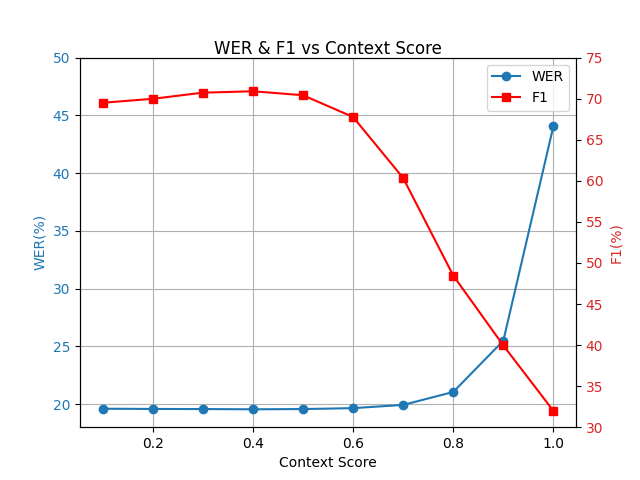
Figure 1: WER and F1 vs context score, averaged across 4 test datasets with 10-15 keywords each.
-
-
Beam Decoder
If you wish to trade F1 vs WER (figure 2), adjust only
context_score:-
Try 0.6-1.0
-
Lowering towards 0.6 -> slightly better WER and precision, slightly lower F1 and recall.
-
Exceeding 1.0 typically degrades both WER and F1.
-
The default is recommended.
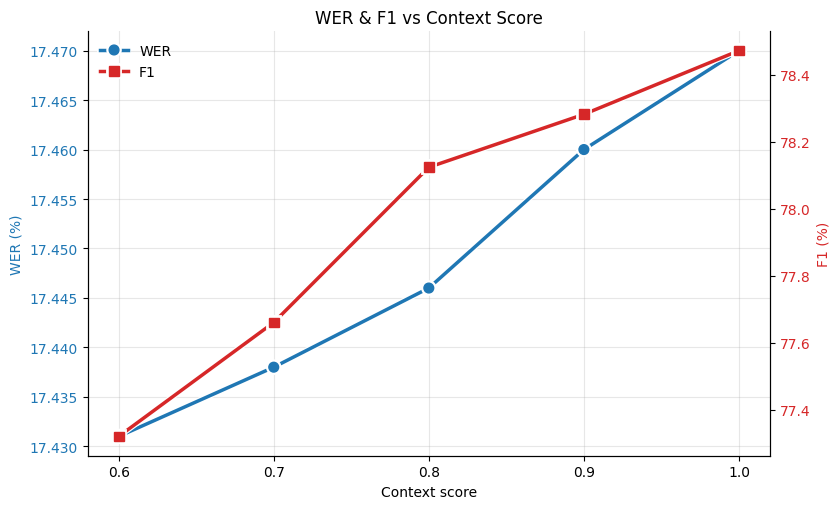
Figure 2: WER and F1 vs context score, averaged across 4 test datasets with 10-15 keywords each.
See figure 3 for scaling with the number of boosted keywords. Although the framework is remarkably robust to out-of-domain “distractors”, best results come from keeping the list of keywords relevant.
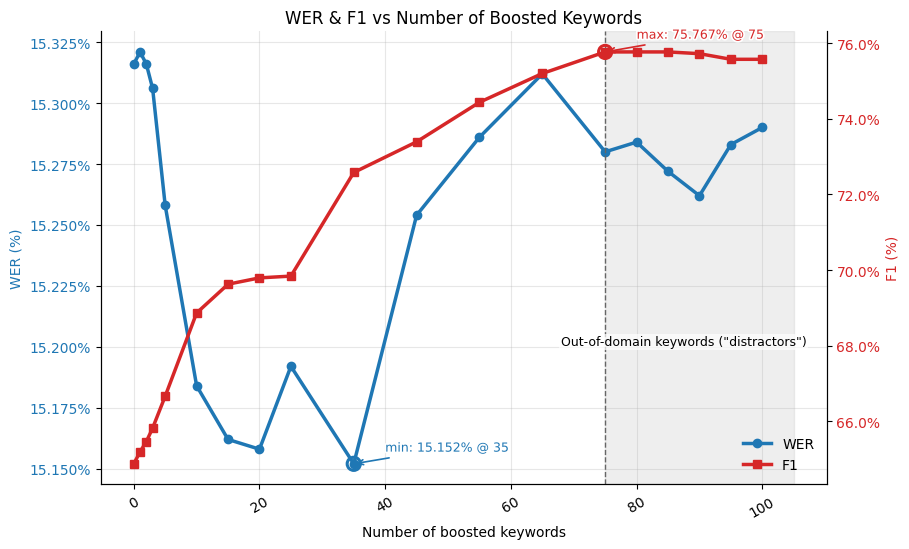 Figure 3: WER and F1 versus the number of boosted keywords for one test dataset. The shaded region (>75) adds out-of-domain “distractor” phrases in addition to the original 75 relevant ones.
-
Expected Results
When boosting is enabled:
- F1: 10-40% relative improvement
- WER: up to ~1% relative improvement
Actual gains vary by domain, audio conditions, and list composition.
References
[1] A. Andrusenko, V. Bataev, L. Grigoryan, V. Lavrukhin, and B. Ginsburg, ‘TurboBias: Universal ASR Context-Biasing powered by GPU-accelerated Phrase-Boosting Tree’, arXiv [eess.AS]. 2025.
Export inference checkpoint
To run your model on Myrtle.ai’s hardware-accelerated inference server you will need a hardware checkpoint. This is a training checkpoint with additional data such as mel-bin mean and variances as described here.
By default, train.sh will automatically create hardware checkpoints for your
best and last checkpoints.
If your best checkpoint is /results/RNN-T_best_checkpoint.pt,
you can find the hardware checkpoint at /results/RNN-T_best_checkpoint.hw.pt.
Creating a hardware checkpoint manually
If you want more customization,
you can also create a hardware checkpoint from
a training checkpoint using the hardware_ckpt.py script.
To create a hardware checkpoint run:
python -m caiman_train.export.hardware_ckpt \
    --ckpt /results/RNN-T_best_checkpoint.pt \
    --config <path/to/config.yaml> \
    --output_ckpt /results/hardware_checkpoint.example.pt
where /results/RNN-T_best_checkpoint.pt is your best checkpoint.
The script should take a few seconds to run.
The generated hardware checkpoint will contain the sentencepiece model specified in the config file and the dataset mel stats.
The hardware checkpoint also records which prefixes the model was trained with,
and the one it was validated with during training (--pnc_prefix and --val_lang_prefix),
so the inference server can validate a requested prefix and use that one by default
(see Model Info).
The export will also find the binary n-gram generated during preprocessing, as specified by the ngram_path field in the config file, check it and print its path, as it is a separate file to keep next to the hardware checkpoint.
However, this is optional, and can be skipped by passing the --skip_ngram flag:
python -m caiman_train.export.hardware_ckpt \
    --ckpt /results/RNN-T_best_checkpoint.pt \
    --config <path/to/config.yaml> \
    --output_ckpt /results/hardware_checkpoint.example.pt \
    --skip_ngram
To use an n-gram that was generated on a different dataset, use the --override_ngram_path argument:
python -m caiman_train.export.hardware_ckpt \
    --ckpt /results/RNN-T_best_checkpoint.pt \
    --config <path/to/config.yaml> \
    --output_ckpt /results/hardware_checkpoint.example.pt \
    --override_ngram_path /path/to/ngram.binary
The n-gram file
The n-gram is not stored in the hardware checkpoint (which has only its scale factor). It can be large (many GB), so it is a separate file that the inference server memory-maps: any number of servers share one copy of it in memory.
The export does not copy it: it prints the path of the n-gram file it used (the one found from ngram_path in the config, or --override_ngram_path), and that file is what you upload to wherever you put the hardware checkpoint.
The inference server has to be given the file with --ngram-binary-path.
The n-gram file is the KenLM binary, unchanged, followed by the hash of the SentencePiece model it was made for; caiman_model.ngram_file describes the format.
scripts/generate_ngram.sh writes it, and python -m caiman_model.ngram_file append <ngram> <sentencepiece model> adds it to an existing n-gram (info <ngram> prints what a file records).
Validation, the export and the inference server refuse an n-gram file that says it was made for another SentencePiece model than the checkpoint’s. One that doesn’t say can still be used, with a warning, as nothing can check it.
Stock KenLM loads these files; asking it for their vocabulary strings needs our KenLM fork, which the training image installs.
Config & checkpoint hierarchy
This note describes how the YAML config, the in-memory model config, the training checkpoint, and the hardware checkpoint relate to one another, and the functions that convert between them. It is aimed at developers changing any of these layers: keep the flow below intact so the downstream Myrtle inference server keeps loading our checkpoints.
Paths below are relative to a package’s src/ directory: rnnt/, export/,
lhotse/ and utils/ are training’s, under caiman_train/src/caiman_train/,
and caiman_model/ is the caiman_model package, which loads hardware
checkpoints without the training code. configs/ is caiman_train/configs/.
The flow
                 configs/*.yaml  (training config, superset of everything)
                        │
          config.load() │  rnnt/config.py
                        ▼
                  cfg: dict ────────────────────────────────────────┐
                        │                                           │
          config.rnnt() │  (validate_and_fill against RNNT kwargs)  │ inference_only_config()
                        ▼                                           │  export/hardware_ckpt.py
              rnnt kwargs: dict                                     ▼
                        │                          RNNTInferenceConfigSchema  caiman_model/export_schema.py
       rnnt/model.RNNT  │  (kwargs -> ConfigRNNT)  (drops training-only fields, extra="forbid")
                        ▼                                           │
                  ConfigRNNT  caiman_model/model.py                 │  .model_dump()
                        │                                           ▼
caiman_model/model.RNNT │  (builds nn.Modules)              inference config: dict
                        ▼                                           │
                  RNNT (nn.Module)                                  │
                        │                                           │
   Checkpointer.save()  │  export/checkpointer.py                   │
                        ▼                                           │
          training checkpoint  (*.pt)                               │
                        │                                           │
   create_hardware_ckpt │  export/hardware_ckpt.py  ◄───────────────┘
                        ▼
          hardware checkpoint  (*.hw.pt)
                        │
   load_hw_checkpoint() │  caiman_model/load_hw.py   (inference-side entry point)
                        ▼
          Checkpoint
The artifacts
| Artifact | Where | What it is |
|---|---|---|
| Training config | configs/*.yaml | Human-authored superset of all training and inference settings. |
cfg dict | config.load() (rnnt/config.py) | The YAML parsed into a dict (tokenizer labels filled in). |
ConfigRNNT | caiman_model/model.py | The canonical, validated dataclass the model is built from. The single source of truth for model shape. |
RNNT (base) | caiman_model/model.py | Pure nn.Module. Built from a ConfigRNNT. Kept dependency-light (see caiman_model/AGENTS.md). |
RNNT (training) | rnnt/model.py | Subclass adding the training/loss machinery (apex joint, lr factors, forward). Takes kwargs, assembles a ConfigRNNT, and calls the base __init__. |
Training checkpoint (*.pt) | Checkpointer.save() (export/checkpointer.py) | state_dict + ema_state_dict + optimizer + training metadata. Used to resume training and as the source for hardware export. |
Hardware checkpoint (*.hw.pt) | create_hardware_ckpt() (export/hardware_ckpt.py) | Self-contained inference artifact: EMA weights, the inference config, mel stats, the sentencepiece model bytes, the n-gram’s scale factor (the n-gram itself is a separate file, see below), and a version. This is the contract with the inference server. |
Checkpoint | caiman_model/load_hw.py | A hardware checkpoint read back into Python: a ready-to-run RNNT plus the data needed around it. |
N-gram file (ngram.binary) | scripts/generate_ngram.sh | The KenLM binary followed by the hash of the sentencepiece model it was made for (caiman_model/ngram_file.py). See the n-gram file. |
Two different “schemas”
These are easy to confuse — they validate different things:
- Config schema —
caiman_model/export_schema.py(RNNTInferenceConfigSchemaand friends). A pydantic model that ingests the YAML config and drops every training-only field (listed per-class inallow_ignore) while forbidding unknown ones (extra = "forbid").inference_only_config()runs this andmodel_dump()s the result into the hardware checkpoint’srnnt_config. If you add a YAML field, decide whether the inference server needs it: if not, add it to the relevantallow_ignore; if so, update the server too.caiman_train/tests/export/test_hardware_ckpt.pyguards this contract against drift. - State-dict / tensor schema —
export/model_schema/(base.json,large.json,xlarge.json, checked bycheck_model_schema()). Validates that the model’s weight tensor shapes match a supported FPGA model variant. A checkpoint that doesn’t match raisesCheckpointNotSupportedErrorand is skipped.
Invariants for future changes
ConfigRNNTis the one place that defines model shape. BothRNNTconstructors funnel through it; don’t add a parallel path that builds modules from raw kwargs.prefix_token_mapis not part of the inference config schema (it lives inModelSchema.allow_ignore). It is instead persisted at the top level of the checkpoint asraw_prefix_token_map, soload_hw.pyreads it from there and feeds it back intoConfigRNNT. Keep these two ends in sync.prefix_spec(aPrefixSpec,caiman_model/prefix.py, stored as a plain dict) is built bybuild_prefix_spec()(utils/prefix.py) from the sameConditionalthatbuild_conditional()(lhotse/config_build.py) builds for the training data, since the YAML config alone can’t say which prefixes a model was trained with. Keepbuild_prefix_spec()in sync with howPrefixTokenize(lhotse/text.py) picks prefixes. ANonedefault_prefixinside it means no prefix, whereas aNoneor missingprefix_specmeans unknown. Onlywrite_prefix_spec()andread_prefix_spec()(caiman_model/prefix.py) touch the stored dict, and the latter handles both kinds of unknown.Checkpointer.save()requiresprefix_specso it is never silently unknown.- The hardware checkpoint’s
state_dictis the EMA weights (traincp["ema_state_dict"]), not the rawstate_dict. mau_programis the oneCheckpointfield this repo never writes.create_hardware_ckpt()doesn’t emit it,load_hw.pyreads it back opaquely, and the inference server doesn’t use it, so it isNonefor a plain hardware checkpoint.blank_biasis the blank bias tuned at the end of training, orNoneif untuned. It is tuned for greedy decoding and is not applied to the exported weights.load_hw_checkpointreconstructs a torch-backendRNNT, or aVolloRNNT
Inference flow
The CAIMAN-ASR server provides low-latency, real-time streaming ASR workloads behind a convenient WebSocket API. This section describes how to set up the CAIMAN-ASR server for inference.
To use the inference you need to obtain a license, program the FPGA and then run the server docker image (or the demo image for a quick start).
Licensing
Licenses are required for each FPGA, and each license is tied to a particular FPGA’s unique identifier. Licenses may also have a maximum version number and release date that they support. Additional or replacement licenses can be purchased by contacting Myrtle.ai or Achronix.
The CAIMAN-ASR server can run in “CPU mode”, where the FPGA is not used and all inference is done on the CPU. This does not require a license and is useful for testing; however the throughput of the CPU is much lower. For details of how to run this, see the CAIMAN-ASR server documentation.
The directory containing the license file(s) is passed to the server’s start script: see CAIMAN-ASR server and CAIMAN-ASR demo.
Programming the Achronix Speedster7t FPGA
The bitstream that goes on the FPGA supports all the model architectures, and it only needs to be reprogrammed when Myrtle.ai releases an updated bitstream. If you have received a demo system from Achronix or Myrtle.ai then the bitstream will likely already have been set up for you and you will not need to follow this step.
Checking that the card has enumerated
You can check if the card has enumerated properly if lspci lists any devices with ID 12ba:0069
$ lspci -d 12ba:0069
25:00.0 Non-Essential Instrumentation [1300]: BittWare, Inc. Device 0069 (rev 01)
There should be a result for each card. If the card has not enumerated properly, you may need to power cycle the machine.
Flashing via JTAG
The board needs to have a JTAG cable connected to enable it to be flashed. See the VectorPath documentation for more information on how to connect the JTAG cable.
You also need to have the Achronix ACE software installed on the machine. To acquire the Achronix tool suite, please contact Achronix support. A license is not required, as “lab mode” is sufficient for flashing the FPGA.
Enter the ACE console:
sudo rlwrap /opt/ACE_9.1.1/Achronix-linux/ace -lab_mode -batch
Then run the following command:
jtag::get_connected_devices
This will list the devices connected via JTAG. As above, there should be one device ID for each card. If you have multiple devices connected you will need to repeat the programming step for all of them.
Set the jtag_id variable to the device ID (X) of the card you want to program:
set jtag_id X
Then run the following commands to program the card:
spi::program_bitstream config2 bitstream_page0.flash 1 -offset 0 -device_id $jtag_id -switch30
spi::program_bitstream config2 bitstream.flash 4 -offset 4096 -device_id $jtag_id -switch30
Now power-cycle the machine and the card should be programmed. A reboot is not sufficient.
CAIMAN-ASR server release bundle
Release name: caiman-asr-server-<version>.run
This release bundle contains all the software needed to run the Myrtle.ai CAIMAN-ASR server in a production environment. This includes the server docker image, a simple Python client, and scripts to start and stop the server. Three model architectures are supported:
baselargeextra-large
The server runs a hardware checkpoint exactly as it is exported from training (see Exporting a checkpoint). It recognises the architecture from the checkpoint’s weight shapes. A checkpoint that does not match one of the supported architectures is rejected at startup, and the error names the tensors that differ.
Model checkpoints are not part of the bundle because of their size; they are shipped as one zip per model.
Extract each into a models/<model> directory next to the start script, so that the
models/<model>/caiman_asr_checkpoint.pt paths used below resolve. For a checkpoint
you exported yourself, pass its path to --rnnt-checkpoint instead.
The CAIMAN-ASR server supports two backends: CPU and FPGA. The CPU backend is not real time, but can be useful for testing on a machine without an Achronix Speedster7t PCIe card installed. The performance page gives the number of concurrent transcription streams the FPGA backend supports per card for each model.
Quick start: CPU backend
-
Load the CAIMAN-ASR server docker image:
docker load -i docker-asr-server.tgz -
Start the CAIMAN-ASR server with a checkpoint:
./start_asr_server.sh --rnnt-checkpoint models/<model>/caiman_asr_checkpoint.pt --cpu-backend -
Once the server prints “Server started on port 3030”, you can start the simple client. This will send a librispeech example wav to the CAIMAN-ASR server and print the transcription:
cd simple_client
./build.sh # only needed once to install dependencies
./run.sh
cd ..
To detach from the running docker container without killing it, use ctrl+p followed by ctrl+q.
-
Stop the CAIMAN-ASR server(s)
./kill_asr_servers.sh
Quick start: FPGA backend
If you are setting up the server from scratch you will need to flash the Achronix Speedster7t FPGA with the provided bitstream. If you have a demo system provided by Myrtle.ai or Achronix, the bitstream will already be flashed. See the Programming the card section for instructions on flashing the FPGA before continuing.
The same checkpoint is used for both backends.
-
Load the CAIMAN-ASR server docker image
docker load -i docker-asr-server.tgz -
Start the CAIMAN-ASR server with the checkpoint (use
--card-id 1to use the second card).--license-dirshould point to the directory containing your license files. See the Licensing section for more information../start_asr_server.sh --rnnt-checkpoint models/<model>/caiman_asr_checkpoint.pt --license-dir "./licenses/" --card-id 0To detach from the running docker container without killing it, use ctrl+p followed by ctrl+q.
-
Once the server prints “Server started on port 3030”, you can start the simple client. This will send a librispeech example wav to the CAIMAN-ASR server and print the transcription:
cd simple_client ./build.sh # only needed once to install dependencies ./run.sh cd .. -
Stop the CAIMAN-ASR server(s)
./kill_asr_servers.sh
To use the extra-large model, point --rnnt-checkpoint at its checkpoint instead.
State resets
State resets improve the word error rate of the CAIMAN-ASR server on long utterances by resetting the hidden state of the model after a fixed duration.
This improves the accuracy but reduces the number of real-time streams that can be supported, as the performance page shows.
If your audio is mostly short utterances (less than 60s), you can disable state resets to increase the number of real-time streams that can be supported.
State resets are switched on by default, but they can be disabled by passing the --no-state-resets flag to ./start_asr_server.sh.
More information about state resets can be found here.
Blank bias
See Blank bias.
Beam decoding
Beam decoding improves WER but reduces RTS;
see here for more details.
Beam search is switched on by default,
but it can be disabled by passing the --no-beam-decoder flag.
More information about beam decoding is here.
When decoding with beam search, the server will return two types of response, either ‘partial’ or ‘final’. For more details, see here.
EOS decoding
The handling of EOS tokens at inference time can be controlled via flags passed to the ASR server. See here for a description of the following terminology. The inference server decoding modes are:
- Classic (default or pass
--eos-mode classic) - The model internally predicts<EOS>tokens and feeds them back into the prediction network however, the<EOS>tokens are stripped from the responses. Hence, they are invisible to the user. The identity parameters are used in the decoder. - Stream EOS (pass
--eos-mode stream) - This mode operates exactly as the Classic mode, except that the<EOS>tokens are returned to the user. In this mode with the beam decoder, partials/finals are entirely orthogonal to<EOS>. - Terminal EOS (pass
--eos-mode terminal) - In this mode the endpointing hyper-parameters can be controlled via the--eos-multiplier eos_alphaand--eos-threshold eos_betaflags to control the end-pointing aggressiveness. If the model predicts an<EOS>token the server will close the connection. With the beam decoder the<EOS>token will always arrive in the last final if terminated by an EOS.
Silence-termination (VAD)
The ASR server can fallback to a VAD in case the model misses an EOS token. This can be enabled with the --silence-terminate-seconds your_time_in_seconds flag. This operates orthogonally to terminal EOS mode. However, it is recommended to set --silence-terminate-seconds 2 when using terminal EOS mode, as Myrtle.ai has found this to have minimal impact on WER.
Connecting to the websocket API
The websocket endpoint is at ws://localhost:3030.
See Websocket API for full documentation of the websocket interface.
See Prefix for the default prefix and how to override it. Keyword boosting is configured per connection. A client flush request finalizes a segment while keeping the connection and its settings.
The code in simple_client/simple_client.py is a simple example of how to connect to the CAIMAN-ASR server using the websocket API.
The code snippets below demonstrate connecting to an English model in Python.
Initially the client needs to open a websocket connection to the server.
ws = websocket.WebSocket()
ws.connect(
    "ws://localhost:3030/asr/v0.1/stream?"
    "content_type=audio/x-raw;format=S16LE;channels=1;rate=16000&prefix=%3Cpnc%3E"
)
Then the client can send audio data to the server.
for i in range(0, len(samples), samples_per_frame):
    payload = samples[i : i + samples_per_frame].tobytes()
    ws.send(payload, websocket.ABNF.OPCODE_BINARY)
The client can receive the server’s response on the same websocket connection. Sending and receiving can be interleaved.
msg = ws.recv()
print(json.loads(msg)["alternatives"][0]["transcript"], end="", flush=True)
When the audio stream is finished the client should send a blank frame to the server to signal the end of the stream.
ws.send("", websocket.ABNF.OPCODE_BINARY)
The server will then send the final transcriptions and close the connection.
The server consumes audio in 60ms frames, so for optimal latency the client should send audio in 60ms frames. If the client sends audio in smaller chunks the server will wait for a complete frame before processing it. If the client sends audio in larger chunks there will be a latency penalty as the server waits for the next frame to arrive.
A more advanced client example in Rust is provided in caiman-asr-client; see Testing inference performance for more information.
WebSocket API for Streaming Transcription
Connecting
To start a new stream, the connection must first be set up. A WebSocket
connection starts with a HTTP GET request with header fields Upgrade: websocket and Connection: Upgrade as per
RFC6455.
GET /asr/v0.1/stream HTTP/1.1
Host: api.myrtle.ai
Upgrade: websocket
Connection: Upgrade
Sec-WebSocket-Key: dGhlIHNhbXBsZSBub25jZQ==
Sec-WebSocket-Protocol: stream.asr.api.myrtle.ai
Sec-WebSocket-Version: 13
If all is well, the server will respond in the affirmative.
HTTP/1.1 101 Switching Protocols
Upgrade: websocket
Connection: Upgrade
Sec-WebSocket-Accept: s3pPLMBiTxaQ9kYGzzhZRbK+xOo=
Sec-WebSocket-Protocol: stream.asr.api.myrtle.ai
The server will return HTTP/1.1 400 Bad Request if the request is invalid.
Request Parameters
Parameters are query-encoded in the request URL.
Content Type
| Parameter | Required | Default |
|---|---|---|
content_type | Yes | - |
Requests must specify the audio format with the content_type parameter; the server does not
infer it, and the connection is rejected if it’s missing. Currently only audio/x-raw is supported.
Supported content types are:
audio/x-raw: Unstructured and uncompressed raw audio data. If raw audio is used then additional parameters must be provided by adding:format: The format of audio samples. Only S16LE is currently supportedrate: The sample rate of the audio. Only 16000 is currently supportedchannels: The number of channels. Only 1 channel is currently supported
As a query parameter, this would look like:
content_type=audio/x-raw;format=S16LE;channels=1;rate=16000
Model Identifier
| Parameter | Required | Default |
|---|---|---|
model | No | "general" |
Requests can specify a transcription model identifier.
Model Version
| Parameter | Required | Default |
|---|---|---|
version | No | "latest" |
Requests can specify the transcription model version. Can be "latest" or a specific version id.
Model Language
| Parameter | Required | Default |
|---|---|---|
lang | No | "en" |
The BCP47 language tag for the speech in the audio.
For multilingual models, select the language through prefix rather than lang.
Prefix
| Parameter | Required | Default |
|---|---|---|
prefix | No | Model’s default |
A prefix may be supplied to the model, allowing users to select between punctuated and cased output (<pnc>)
and lowercase output (<nopnc>). If specified, the prefix is applied for the duration of the WebSocket session.
If omitted, the latest server uses the model’s declared default prefix.
The accepted prefixes depend on the model’s training.
Language tags are <lang_en> (English), <lang_fr> (French), <lang_es> (Spanish),
<lang_de> (German), <lang_it> (Italian), <lang_pt> (Portuguese), and
<lang_detect> (automatic detection). Put punctuation first, with no space between tags.
Example:
prefix=<pnc>
An explicit empty value (prefix=) is distinct from omitting the parameter: it forces a
token-less prefix rather than falling back to the server’s default.
For older servers or checkpoints without a declared default, explicitly supply the prefix expected by the model. User-trained models require a prefix only if trained conditionally.
To find out which prefix the deployed model expects, query the Model Info endpoint.
Keyword Boosting
| Parameter | Required | Default |
|---|---|---|
keywords | No | None |
Keyword boosting allows you to provide a list of words or phrases that are prioritised during decoding. CAIMAN-ASR supports keyword boosting of up to 100 keywords.
Keywords are supplied by repeating the keywords query parameter in the WebSocket request URL.
For each keyword, append &keywords=<KEYWORD> to the query string.
For example:
&keywords=caiman&keywords=asr
Optional boost controls use these query parameters:
| Parameter | Default | Meaning |
|---|---|---|
keyword_c0 | 0.3 | Start-of-keyword boost. |
keyword_beta | 0.9 | Front-loading of the boost at depth 2. |
keyword_context_score | 1.0 | Overall boost multiplier. |
Overrides must be finite numbers and require a non-empty keywords list.
Settings apply
to this connection and survive a flush; open a new connection to change them.
The Python CLI uses hyphens, e.g. --keyword-context-score, while query keys use underscores.
Omitted controls use the server-wide values, which default to those above;
these query parameters override them per connection. See Keyword boosting hyperparameters
for the scoring formula and tuning recommendations.
Max Number of Alternatives
| Parameter | Required | Default |
|---|---|---|
alternatives | No | 1 |
The maximum number of alternative transcriptions to provide.
Supported Models
| Model id | Version | Supported Languages |
|---|---|---|
| general | v1 | Depend on the loaded checkpoint; see Prefix |
Request Frames
For audio/x-raw audio, raw audio samples in the format specified in the
format parameter should be sent in WebSocket Binary frames without padding.
Frames can be any length greater than zero.
A WebSocket Binary frame of length zero is treated as an end-of-stream (EOS) message.
Flush without closing the connection
To finalize a segment and continue on the same connection, send a Text frame
containing a JSON object with only the flush key. For example:
ws.send(json.dumps({"flush": "manual"}), websocket.ABNF.OPCODE_TEXT)
The server sends the remaining transcript results, then echoes {"flush": "manual"}
as a Text acknowledgement. Handle this separately from transcript responses:
it has no alternatives field. Subsequent audio starts a new segment with the
same prefix and keyword settings. A zero-length Binary frame instead finishes
input and closes the connection after the remaining results.
Both live and
benchmark clients offer optional --manual-flush controls.
Response Frames
Response frames are sent as WebSocket Text frames containing JSON.
{
  "start": 0.0,
  "end": 2.0,
  "is_provisional": false,
  "alternatives": [
    {
      "transcript": "hello world",
      "confidence": 1.0
    }
  ]
}
API during greedy decoding
start: The start time of the transcribed interval in secondsend: The end time of the transcribed interval in secondsis_provisional: Always false for greedy decoding (but can be true for beam decoding)alternatives: Contains at most one alternative for greedy decoding (but can be more for beam decoding)transcript: The model predictions for this audio interval. Not cumulative, so you can get the full transcript by concatenating all thetranscriptfieldsconfidence: Currently unused
API during beam decoding
When decoding with a beam search, the server will return two types of response, either ‘partial’ or ‘final’ where:
- Partial responses are hypotheses that are provisional and may be removed or updated in future frames
- Final responses are hypotheses that are complete and will not change in future frames
It is recommended to use partials for low-latency streaming applications and finals for the ultimate transcription output. If latency is not a concern you can ignore the partials and concatenate the finals.
Detection of finals is done by checking beam hypotheses for a shared prefix. Once this shared prefix is detected and sent in as a final, all following partials and finals will have that prefix removed. Hence it’s possible to get the full transcript by concatenating all the transcript fields in the finals.
Typically it takes no more than 1 second to get finals (and often they are much faster) to ensure a hard-cap on final latency beam time/depth pruning can be enabled, which discards the least likely hypothesis to ensure that the time between final emissions is bounded.
When running the asr server, partial responses are marked with "is_provisional": true and finals with "is_provisional": false and partials can be one of the many "alternatives: [...]".
During a partial response,
the alternatives are ordered from most confident to least.
During every frame other than the last one, the server will send partials and may also send a final. At the last frame, the server will not send any partials, but may send a final if there is outstanding text.
When the server sends a final and a partial for the same frame, the final will be sent first.
Model Info
The server also exposes a plain HTTP endpoint describing the deployed model, so clients can discover what it expects before opening a stream:
GET /asr/v0.1/model-info HTTP/1.1
The response is JSON:
{"prefix": {"valid_regex": "^(?:<pnc>|<nopnc>)$", "default": "<pnc>"}}
| Field | Description |
|---|---|
prefix.valid_regex | Regular expression (Rust regex syntax) that a prefix must match, or null if the checkpoint doesn’t declare its prefix shape (the server then only checks that each token exists). |
prefix.default | The prefix the server uses when none is supplied. An empty string means the model takes no prefix. |
A request whose prefix doesn’t match valid_regex is rejected with 400 Bad Request.
Closing the Connection
The client should not close the WebSocket connection, it should send an EOS message and wait for a WebSocket Close frame from the server. Closing the connection before receivng a WebSocket Close frame from the server may cause transcription results to be dropped.
Errors
If an error occurs, the server will send a WebSocket Close frame, with error details in the body.
| Error Code | Details |
|---|---|
| 400 | Invalid parameters passed. |
| 503 | Maximum number of simultaneous connections reached. |
Testing Inference Performance
Release name: caiman-asr-client-<version>.run
This is a simple client for testing and reporting the latency of the CAIMAN-ASR server. It spins up a configurable number of concurrent connections that each run a stream in realtime.
Running
A pre-compiled binary called caiman-asr-client is provided. ./caiman-asr-client --help lists its options.
It takes 16 kHz S16LE single channel wav files.
If you want to run it with many wav files you can use find to list all the wav files in a directory (this
will hit a command line limit if you have too many):
./caiman-asr-client $(find /path/to/wav -name '*.wav') --concurrent-connections 1000 --perpetual --quiet
Building
If you want to build the client yourself you need the rust compiler. See https://www.rust-lang.org/tools/install
Once installed you can compile and run it with
$ cargo run --release -- my_audio.wav --perpetual --concurrent-connections 1000
If you want the executable you can run
$ cargo build --release
and the executable will be in target/release/caiman-asr-client.
How the latency is calculated
This client splits the audio in 60ms chunks and sends a chunk every 60ms, so it’s mimicking live audio. The latency is measured by the client, and it is the time from the chunk being sent to the response for that chunk being received. (The CAIMAN-ASR server sends a response for every 60ms chunk it receives, whether or not it has a token for this chunk, so this is always well-defined.)
This means that the reported latency includes the following:
- The time for the packet to go from the client to the server across the network
- The time for the chunk to be processed by the server
- The time for the response to go from the server back to the client.
It doesn’t include:
- The size of the chunk itself (60ms). If you imagine a live stream of audio that starts at t=0, then at t=60ms the first chunk of audio would be sent. Say that the time taken to receive a response from the server is 50ms, then the first response would be received at 110ms. But we don’t say that the latency is 110ms because we don’t include the size of the chunk in the calculation.
The latency reported by the client is the average and p99 for all the chunks in the previous (configurable) reporting period. The latency reported when the transcription comes back is the average and p99 for all the chunks in that transcription.
To prevent each connection sending audio at the same time, the client waits a random length of time (within the frame duration) before starting each connection. This provides a better model of real operation where the clients would be connecting independently.
Troubleshooting
The client uses a file descriptor for each audio connection.
The number of file descriptors available to a process is limited by the operating system.
If you see the error Too many open files, you can increase the limit by adding the following lines
to /etc/security/limits.conf:
* soft nofile 40000
* hard nofile 40000
You can check the limit with:
ulimit -n
Demonstrating live transcription using a local microphone
The live demo client is found in the caiman_client directory.
This script connects to a running CAIMAN-ASR server and streams audio from your microphone to the server for low-latency transcription.
Step 1: Set up the CAIMAN-ASR server
Follow the instructions provided in Inference Flow to set up the ASR server.
Step 2: Set up the client
From the repository’s root, run:
uv run --locked caiman_client --host localhost --port 3030
With the host and port of your server, --help lists the client’s options.
Prefix (punctuation/casing and language)
--prefix selects the output format and language, for example for English with
a multilingual model:
uv run --locked caiman_client --host localhost --port 3030 --prefix='<pnc><lang_en>'
Quote the prefix and leave no spaces between tags. See Prefix for the prefixes a model accepts and the default.
Keyword Boosting
To boost keywords, pass them to --keywords as a space-separated list, e.g.
uv run --locked caiman_client --keywords caiman asr myrtle \
  --keyword-c0 0.3 --keyword-beta 0.9 --keyword-context-score 1.5
The --keyword-* flags override the server’s boost controls for this
connection; see Keyword boosting.
Flush
Add --manual-flush to enable Enter-to-flush in an interactive terminal:
uv run --locked caiman_client --manual-flush
While recording, press Enter to finalize the current segment and continue on
the same connection. The client displays [Flush complete: manual] when acknowledged.
Prefix and keyword settings are retained. Press Ctrl+C to finish recording and
save the audio.
Troubleshooting
If the client records from the wrong microphone, or records nothing (it stops
with No audio from the microphone), choose the input device yourself:
- Run
uv run --locked caiman_client_devicesto list available input devices - Try each device using (for example)
uv run --locked caiman_client --input_device 5
Hardware requirements
The following is a guide to the hardware requirements for the CAIMAN-ASR server.
Host requirements
The CAIMAN-ASR server requires a host machine with the following specifications:
- Four CPU cores per VectorPath card
- 4 GB of memory per VectorPath card
- 100 GB of storage
- Ubuntu 22.04 LTS (recommended)
Bandwidth
The server requires 500 Mbits/s of bandwidth per 1000 streams. For example, 2000 streams would require 1 Gbit/s of bandwidth. The bandwidth is dependent on the number of streams and not the number of cards (see the performance page for the streams a card handles). This figure has some headroom built in; the measured value on a reliable connection is 700 Mbits/s for 2000 streams.
CAIMAN-ASR demo
Release name: caiman-asr-demo-<version>.run
This software bundle is used for demonstrating the server.
It includes the asr server and a web interface which shows the live transcriptions and latency of the server.
This is not the right software to use for production installations; the docker container doesn’t expose the server port so external clients cannot connect to it.
For production installations, use the caiman-asr-server-<version>.run release. See instructions in the CAIMAN-ASR server section.
Running the CAIMAN-ASR demo server
If you are setting up the server from scratch you will need to flash the Achronix Speedster7t FPGA with the provided bitstream. If you have a demo system provided by Myrtle.ai or Achronix, the bitstream will already be flashed. See the Programming the card section for instructions on flashing the FPGA.
-
Load the CAIMAN-ASR Demo Server Docker image:
docker load -i docker-asr-demo.tgz -
Start the server with:
./start_server <license directory> [card index]...where
<license directory>is the path to the directory containing your Myrtle.ai licence and[card index]is an optional integer list argument specifying which card indices to use, e.g.0 1 2 3. The default is 0.The demo GUI webpage will then be served at http://localhost.
The latency may be much higher than usual during start-up. Refreshing the webpage will reset the scale on the latency chart.
To shut down the server you can use ctrl+c in the terminal where the server is running.
Alternatively, run the following:
./kill_server
CAIMAN-ASR benchmark
The benchmark streams audio to a CAIMAN-ASR server in real time, as a user would, and
measures the word error rate (WER) and the user-perceived latency. It’s the
caiman_benchmark command in the caiman_eval package, which
uv installs and runs, with the repository’s
default development tools. It needs no GPU or torch:
git clone https://github.com/MyrtleSoftware/caiman-asr-dev.git && cd caiman-asr-dev
Run all the commands below from the repository’s root.
Note on the datasets
The benchmark reads a JSONL manifest, passed with --manifest, and --data_dir, the
directory that its relative audio paths are relative to. Please refer to
benchmarking with custom datasets for
instructions on how to use a custom dataset.
LibriSpeech dev-clean
To benchmark on LibriSpeech dev-clean, first download it, with a manifest of its word alignments:
uv run --locked caiman_benchmark download-librispeech
It prints the --manifest and --data_dir to pass to the commands below.
CAIMAN-ASR
caiman_benchmark run is composed of 2 steps which are both performed in sequence. There are however flags to control the flow and skip individual steps.
- Transcription
- Evaluation
Running the command will perform both steps.
uv run --locked caiman_benchmark run --manifest <manifest> --data_dir <audio_dir> --address <ADDRESS> --port <PORT> --run_name <unique name> --append_results caiman-base --lang_code <lang-code>
where --address is the websocket address of transcription service and --port is the port.
--append_results selects the CSV file the results are added to.
caiman_benchmark run --help lists all the options and their allowed values.
Note on client speed
The client simulates a real user by feeding the audio to the server at real time. Since there are several hours of audio, the client will take several hours to run.
To instead do a trial run on just five audio files,
pass the flag --limit_to 5.
Transcription
This step runs the transcription step and generates *.caiman-asr.trans transcription files. These are saved under --run_name (see --help), mirroring the audio folder layout. For each audio file, the script generates one transcription file.
By default, the transcription is skipped for already done audio,
which will happen if you run the script another time with the same run_name.
This behavior can be changed by passing the --force_transcription flag, and all files will be transcribed from scratch and existing transcription files will be overwritten.
uv run --locked caiman_benchmark run --manifest <manifest> --data_dir <audio_dir> --address <ADDRESS> --port <PORT> --force_transcription --run_name <name of previous run> --append_results caiman-base --lang_code <lang-code>
The transcription step can be skipped by passing the --skip_transcription flag.
uv run --locked caiman_benchmark run --manifest <manifest> --data_dir <audio_dir> --address <ADDRESS> --port <PORT> --skip_transcription --run_name <name of previous run> --append_results caiman-base --lang_code <lang-code>
Evaluation
This step aggregates the generated trans files into a hypothesis JSONL and computes word error rate (WER) and latency. The evaluation step can be skipped by passing the --skip_evaluation flag.
uv run --locked caiman_benchmark run --manifest <manifest> --data_dir <audio_dir> --address <ADDRESS> --port <PORT> --skip_evaluation --run_name <unique name> --append_results caiman-base --lang_code <lang-code>
Prefix (punctuation/casing and language)
--prefix selects the output format and language, for example for English with a
model that accepts punctuation and language tags:
uv run --locked caiman_benchmark run --manifest <manifest> --data_dir <audio_dir> --address <ADDRESS> --port <PORT> --run_name <unique name> --append_results caiman-base --prefix='<pnc><lang_en>' --lang_code en
See Prefix for the prefixes a model accepts and the default.
--lang_code controls evaluation normalization, not the model language.
Keyword Boosting
To boost keywords, pass them to --keywords as a space-separated list, e.g.
uv run --locked caiman_benchmark run --manifest <manifest> --data_dir <audio_dir> --address localhost --run_name keyword-test \
  --append_results caiman-base --lang_code en \
  --keywords caiman asr myrtle --keyword-c0 0.3 --keyword-beta 0.9 \
  --keyword-context-score 1.5
The --keyword-* flags override the server’s boost controls, the same for each
file; see Keyword boosting.
Use a new --run_name when comparing settings to avoid reusing transcripts.
Flush
Add --manual-flush to enable Enter-to-flush in an interactive terminal:
uv run --locked caiman_benchmark run --manifest <manifest> --data_dir <audio_dir> --address localhost --run_name flush-test \
  --append_results caiman-base --lang_code en \
  --manual-flush
Press Enter while audio is streaming to finalize a segment and continue on the
same connection. Acknowledgements are saved as flush_received events; word
timestamps remain relative to the file start.
Each file still ends with an end-of-input message.
With --pause_after_each, Enter at the prompt after a file finishes advances
to the next file. Flushing can affect WER and latency, so compare against a
run without flushing and record when you pressed Enter.
Benchmarking CAIMAN_ASR on custom datasets
Data format in JSONL
The benchmark uses the same JSONL format as
training, so manifests prepared for training or validation can be benchmarked
directly. To select an alternative transcript as the WER reference, pass
--transcript_key (see
selecting transcripts).
For a custom dataset, generate a manifest with reference text in supervisions
and audio paths in recording.sources. Latency also needs word
alignments in each supervision (alignment.word, see
forced alignment).
For example, one line has this structure:
{
  "id": "recording-001",
  "start": 0.0,
  "duration": 11.21,
  "channel": 0,
  "supervisions": [
    {
      "id": "recording-001",
      "recording_id": "recording-001",
      "start": 0.0,
      "duration": 11.21,
      "channel": 0,
      "text": "A sample reference transcript.",
      "alignment": {
        "word": [
          ["A", 0.52, 0.1, 1.0],
          ["sample", 0.66, 0.42, 1.0],
          ["reference", 1.12, 0.5, 1.0],
          ["transcript.", 1.68, 0.7, 1.0]
        ]
      }
    }
  ],
  "recording": {
    "id": "recording-001",
    "sources": [
      {
        "type": "file",
        "channels": [0],
        "source": "audio/recording-001.wav"
      }
    ],
    "sampling_rate": 16000,
    "num_samples": 179360,
    "duration": 11.21,
    "channel_ids": [0]
  },
  "type": "MonoCut"
}
Notes on the custom dataset format
- Audio in a format other than 16 kHz
WAV, such asFLAC, is converted before it’s streamed. - The manifest can be a
.jsonlor.jsonl.gzfile. - Relative audio file paths in the manifest are relative to the
--data_dirdirectory. - Each line must be a
MonoCutthat covers its whole recording (start0 and the recording’sduration) from one audio file. The client streams whole recordings, so the benchmark stops with an error on any other cut.
Running the evaluation on custom data
Run the evaluation script according to the instructions in CAIMAN-ASR benchmark with the additional flags:
--manifest <manifest> --data_dir <audio_dir>
Versions
Documentation for previous versions: